
Grading a class set of essays is where a teacher’s week goes to die. 120 essays at 10 minutes each is 20 hours — and that’s before the second draft comes back. It’s the task teachers say burns them out fastest, and it’s exactly the kind of repetitive, criteria-driven work AI essay grading tools for teachers are genuinely good at.
AI essay graders promise to score student writing against your rubric and draft the feedback in seconds. I spent three weeks testing that promise: I ran the same set of real student essays through six tools — a batch of 9th-grade persuasive essays on school uniforms — using the identical rubric in every tool, then checked how often the AI’s scores matched mine and whether the feedback was something a student could actually use.
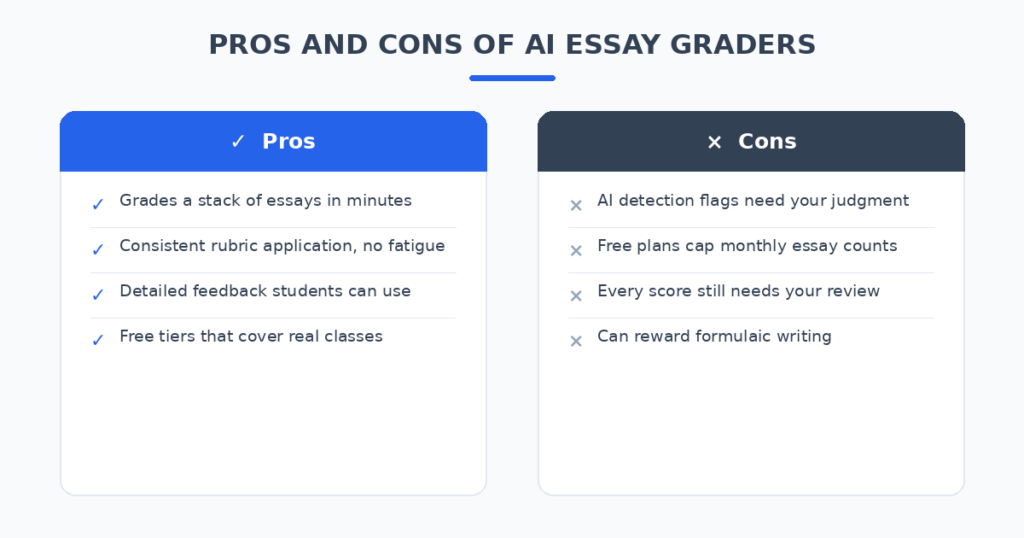
The honest result: none of these tools should grade your class while you watch Netflix. But the good ones turn a 20-hour grading marathon into a 2-hour review session, and the feedback they draft is often more detailed than what a tired teacher writes at midnight.
How I tested these tools
Same essays, same rubric, same brief everywhere. Every tool graded the identical batch of persuasive essays against a 4-criterion rubric (thesis, evidence, organization, conventions), and I scored each tool on five things:
- Score accuracy: How often did the AI’s per-criterion scores match what I gave as the teacher?
- Feedback quality: Is the feedback specific to the student’s writing, or generic filler?
- Rubric control: Can I use my own rubric, or am I stuck with the tool’s defaults?
- Academic integrity: Does it flag likely AI-written or plagiarized work?
- Honest pricing: What does a teacher actually pay — and is the free tier usable for a real class?
The 6 tools I tested
1. EssayGrader — the best all-rounder for essay grading
EssayGrader is the most purpose-built essay grader in this test: upload a batch of essays, attach a rubric (yours or one from its shared library), and it returns per-criterion scores plus feedback reports in about 30 seconds per essay. Its published benchmark claims scores within one point of teacher scores 94% of the time on a 22,000-essay dataset — the most transparent accuracy claim in the category, even if it’s the company’s own number.
In my test it was the closest match to my scores on conventions and organization, and the weakest on thesis quality — nuance is still the hard part. The shared rubric library is genuinely useful, and FERPA compliance plus built-in AI-writing detection make it a safe pick for school use.
Pricing: Free Basic tier (25 essays/month, 1,000-word cap); Lite from $6.99/month (100 essays, 2,000 words); Pro $14.99/month (350 essays, AI detection, bulk upload); Premium $34.99/month (800 essays).
| Pros | Cons |
|---|---|
| Fastest batch grading in the test | 1,000-word cap on the free tier |
| Published accuracy benchmark | Weaker on thesis and nuance |
| Built-in AI-writing detection | LMS bulk import needs a paid plan |
Best for: Teachers who grade a high volume of essays and want speed with a paper trail.
2. CoGrader — the best for Google Classroom batches
CoGrader is built around the workflow most teachers already live in: it imports assignments straight from Google Classroom, grades against a custom rubric or a generated one, and pushes scores back automatically. The free Starter plan covers 100 submissions a month — enough for a real class.
My scores matched well on evidence and organization. Independent reviews call it strong for English, humanities, and social studies but not built for STEM or scanned exams, which matched what I saw. The paid plan adds handwritten assignment support, which matters if your students still write on paper.
Pricing: Free Starter (100 submissions/month); Standard $15/month billed annually ($19 month-to-month) with 350 submissions, handwriting support, and grammar checking.
| Pros | Cons |
|---|---|
| Google Classroom import and grade sync | Not built for STEM or scanned exams |
| Generous free tier (100/month) | Handwriting support needs paid plan |
| Nothing reaches students until you approve | Canvas/Schoology details worth confirming |
Best for: Classroom-based teachers who want grading that starts and ends in their LMS.
3. Writable — the best full writing workflow
Writable isn’t just a grader — it’s a K-12 writing platform where students draft, the AI scores against the rubric, and students revise from the feedback. The grading is one step in a feedback-and-revision loop, which is closer to how writing actually gets taught.
In my test the AI comments were the most actionable for revision — “your second paragraph needs a counterargument” rather than “good effort.” If your goal is better writers rather than faster scores, this is the one. It’s freemium, with school and district plans for the full feature set.
Pricing: Freemium for teachers; paid tiers for schools and districts.
| Pros | Cons |
|---|---|
| Feedback built for student revision | More setup than a pure grader |
| Full writing workflow, not just scoring | Best features need school plans |
| Strong rubric-aligned comments | K-12 focus may not suit higher ed |
Best for: Teachers who want the AI to improve student writing, not just score it.
4. Class Companion — the best for instant student feedback
Class Companion flips the model: instead of grading after submission, it gives students instant, coached feedback while they write. The teacher sets the rubric and the assignment; students get guided suggestions before the work ever lands on your desk.
The essays that came back to me from the Class Companion workflow were noticeably better first drafts — the AI had already caught the missing thesis statements and thin evidence. You still grade the final, but there’s less to fix. It’s freemium, aimed squarely at K-12 classrooms.
Pricing: Freemium; paid plans for expanded use.
| Pros | Cons |
|---|---|
| Students revise before you ever see it | You still grade the final version |
| Coaching-style feedback, not just scores | Focused on short answer and essays |
| Reduces the worst first drafts | Needs student onboarding time |
Best for: Teachers who want fewer painful first drafts to grade.
5. Brisk Teaching — the best for grading inside Google Docs
Brisk lives as a Chrome extension inside Google Docs, which is where many teachers already receive student work. Instead of uploading essays to another platform, you open the doc, and Brisk drafts targeted feedback and rubric-aligned comments right there.
In my test the feedback was solid but slightly less structured than the dedicated graders — the win is zero workflow change. No exports, no new logins, no learning a dashboard. And it does more than grading: lesson feedback, differentiation, and IEP suggestions live in the same extension. Free for teachers with usage limits.
Pricing: Free tier for teachers (with usage limits); paid plans for schools.
| Pros | Cons |
|---|---|
| Works where the essays already are | Feedback less structured than dedicated graders |
| Free for teachers | Chrome/Google ecosystem required |
| Extra tools beyond grading | Usage caps on the free tier |
Best for: Google Docs classrooms that want grading with no new platform.
6. Gradescope — the best for exams and higher ed
Gradescope takes a different approach: it groups similar answers together so you grade one example and apply the decision to every matching response. For exams, problem sets, and any assignment with repeated answer patterns, it’s the fastest tool here by a wide margin.
It’s less about essay feedback and more about grading throughput — which is exactly what a 300-student lecture course needs. It’s a paid product (institutional pricing), so it’s a school purchase rather than an individual teacher signup, but for exam-heavy courses nothing else in this test comes close.
Pricing: Paid; institutional pricing (contact for quote).
| Pros | Cons |
|---|---|
| Unmatched speed for exams and problem sets | Not a writing-feedback tool |
| Consistent rulings across similar answers | Paid institutional product |
| Built for large classes | Overkill for a single essay assignment |
Best for: Higher ed and exam-heavy courses with large enrollments.
AI Essay Grading Tools for Teachers: Quick Comparison
(Pricing changes often — treat these as ballparks and check current plans before deciding.)
| Tool | Starting price | AI strength | AI-writing detection | LMS sync | Best for |
|---|---|---|---|---|---|
| EssayGrader | Free / $6.99/mo | Fast batch rubric scoring | Yes | Classroom, Canvas | High-volume essay grading |
| CoGrader | Free / $15/mo | Classroom-to-grade workflow | Yes (paid) | Google Classroom | Classroom batches |
| Writable | Freemium | Revision-focused feedback | No | Yes | Teaching writing |
| Class Companion | Freemium | Instant coached feedback | No | Yes | Better first drafts |
| Brisk Teaching | Free | In-Docs comments | No | Google Docs | Zero new logins |
| Gradescope | Paid (institutional) | Answer grouping | No | Yes | Exams, large classes |
How I get usable grades from AI essay graders
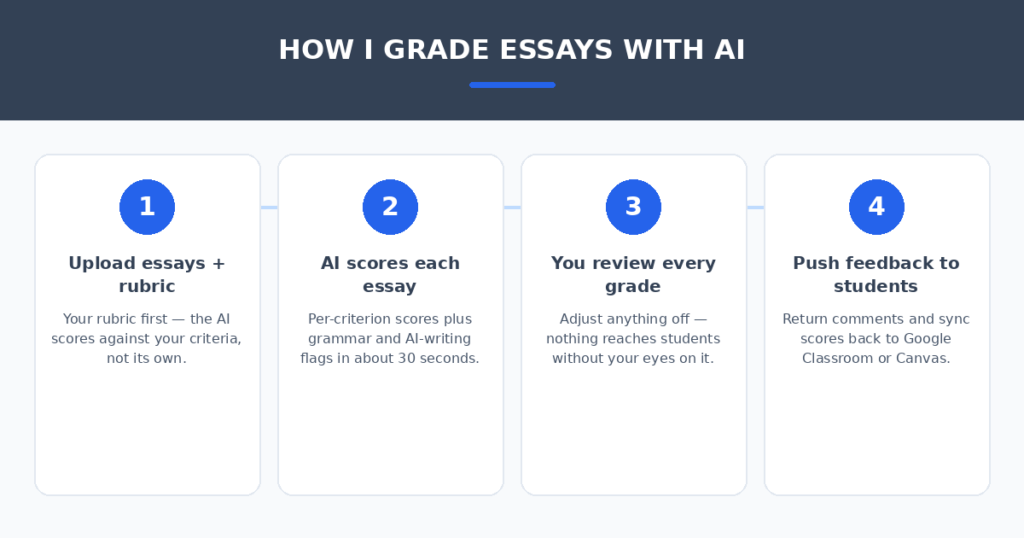
The tool matters less than the routine. Four habits made the difference between scores I trusted and scores I had to redo:
- Grade with your rubric, not theirs. Every good tool accepts a custom rubric — upload yours before anything else. The rubric is the whole game: generic criteria get generic scores.
- Calibrate on five essays first. Run a small sample, compare the AI’s scores to yours, and adjust the rubric wording where it drifts. Thirty minutes of calibration saves hours of corrections later.
- Review every score before it goes out. Skim the AI’s per-criterion scores for each essay — you’ll catch the drift cases in seconds. No tool here should send grades directly to students.
- Treat AI-detection flags as advisory. No detector is fully accurate. A flag means look closer at the essay, not accuse the student. The teacher makes the final call, always.
Grading is only half the teacher workload — if AI is also doing your Sunday-night planning, I compared AI lesson plan generators for teachers on the same hands-on basis. And if you tutor privately and need to bill for it, AI invoice generators for freelancers turn a sentence into a payable invoice.
FAQ
Is it ethical to use AI to grade student essays?
Yes — under the same standard as any grading aid. You review every score, you can explain every grade, and the rubric is yours. The AI drafts; you decide. What’s not ethical is letting a tool send grades to students without your review.
How accurate is AI essay grading?
On mechanical criteria (conventions, organization) it’s very close to human scoring — EssayGrader’s published benchmark claims within-one-point agreement 94% of the time. On thesis quality and nuance, expect more drift. Calibration with your own sample matters more than any vendor claim.
Can these tools detect AI-written student essays?
EssayGrader and CoGrader (paid plan) include AI-writing detection, but no detector is fully accurate. Treat flags as a prompt to look closer, never as proof. False accusations damage trust far more than a missed flag.
Are these tools safe for student data?
Education-focused tools like EssayGrader comply with FERPA. The rule stays simple: use education-specific platforms for anything involving real student work, and never paste identifiable student writing into a general public chatbot.
Is the free tier actually enough?
For a single class, usually yes to start: CoGrader’s 100 free submissions a month and Brisk’s free tier cover real grading loads. You’ll hit caps when you grade every assignment with AI — that’s when the $7–15/month paid tiers pay for themselves in one evening.
My verdict
For most teachers, EssayGrader is the pick — the fastest batch grading, a real accuracy benchmark, built-in AI detection, and a free tier to prove it works. If your school runs on Google Classroom, CoGrader removes the import-export friction entirely. If you care more about better writers than faster scores, Writable wins. And if you grade inside Google Docs already, Brisk Teaching costs nothing to try.
The Sunday-night grading marathon is a solved problem. Pick the tool that matches where your essays live, calibrate it with your rubric, review every score like the expert you are — and spend the hours you save actually teaching writing.
Related reading
Sources: Edutopia