

Writing a compelling listing description takes 30 to 60 minutes when done properly — a time sink AI listing description tools for real estate agents promise to eliminate. Multiply that by a dozen active listings and you’ve lost a full workday to adjectives. Worse, listing number twelve never reads as well as listing number one — fatigue shows in the copy.
AI listing description tools promise MLS-ready copy from basic property details in seconds. I put that to the test: I fed the same property to six tools — a 3-bed, 2-bath ranch with a renovated kitchen, 1,850 square feet, asking $425,000 — using the identical property brief each time, then judged the output on whether I’d actually publish it.
The honest result: AI doesn’t replace your knowledge of the property, but it kills the blank page completely. The best tools produce copy I’d publish with a two-minute edit; the worst produce the same generic “charming home in a great neighborhood” filler buyers scroll straight past.
How I tested these tools
Same property brief, same instructions everywhere. Every tool got the ranch listing details and was asked for a sub-250-word MLS description, and I scored each on five things:
- Copy quality: Would I publish this with minor edits, or does it need a rewrite?
- Tone control: Can I switch between luxury, family-friendly, and investor-focused language?
- MLS readiness: Does the output fit MLS formatting and character limits?
- Extra content: Does it also generate social posts, emails, or open house copy?
- Honest pricing: What does an agent actually pay — and is there a usable free option?
The 6 tools I tested
1. ListingAI — the best purpose-built MLS descriptions
ListingAI is built for exactly one job: turning property details into MLS-ready listing descriptions. Enter bedrooms, bathrooms, features, and neighborhood, and it returns polished copy formatted for your MLS — the tool claims it cuts description time from 30 minutes of writing to under two minutes of review.
In my test it produced the most publish-ready draft of the purpose-built tools: strong opening hook, features tied to benefits, and SEO-relevant terms baked in. The feature-highlighting logic genuinely picked the renovated kitchen as the lead. Batch generation handles multiple listings at once.
Pricing: Plans from around $10–30/month, with per-listing pricing available for low-volume agents.
| Pros | Cons |
|---|---|
| Most publish-ready drafts in the test | Focused on descriptions, not full marketing |
| MLS-ready formatting out of the box | Monthly cost adds up for part-time agents |
| Batch generation for multiple listings | You still supply all the property facts |
Best for: Agents managing multiple active listings who want descriptions done in minutes.
2. ListWorks PRO — the best all-in-one listing marketing kit
ListWorks PRO goes beyond the description: from one property input it generates the listing description, social media posts, email blasts, and open house scripts. For an agent who markets every listing across five channels, that’s the whole content job in one place.
My test confirmed the breadth: the Instagram caption and the email blast were genuinely usable, not afterthoughts. Tone options (luxury, cozy, modern) actually changed the voice rather than swapping a few adjectives. You get 3 free rewrites with no credit card to prove it works before paying.
Pricing: Free to try (3 rewrites, no credit card); paid plans for full use — check current pricing.
| Pros | Cons |
|---|---|
| Description plus social, email, and scripts | Paid pricing not published upfront |
| Real tone differences, not cosmetic | More than you need for a single channel |
| Free trial with no credit card | Output needs a fair-housing check |
Best for: Agents who market every listing across social, email, and open houses.
3. Write.homes — the best quick listing copy
Write.homes is a purpose-built listing description generator with a simple pitch: property details in, polished listing copy out. No dashboards to learn, no marketing suite to configure — it’s the fastest path from a blank MLS field to a finished description.
In my test the output was clean and professional, if slightly less distinctive than ListingAI’s. For agents who just need the description done well and fast, the simplicity is the selling point — under two minutes per listing including your review.
Pricing: Free to start; paid plans add volume — check current pricing.
| Pros | Cons |
|---|---|
| Fastest path to a finished description | Less distinctive voice than top picks |
| No learning curve | Limited extra content types |
| Usable free tier | Pricing details thin on the site |
Best for: Agents who want the description done fast with zero setup.
4. Addressable — the best full property-to-content workflow
Addressable handles the full workflow — property in, content out, distributed. It generates the listing description plus social posts, neighborhood content, and email campaigns, then helps push them out. It’s less a writing tool and more a listing-marketing system.
My test showed the strength is consistency: every piece of content for the property carried the same positioning and voice. For a listing-heavy practice, that coherence across channels is worth more than any single great paragraph.
Pricing: Pricing on request — check the site for current plans.
| Pros | Cons |
|---|---|
| One workflow from property to published | Pricing not transparent |
| Consistent voice across all channels | Overkill for occasional listings |
| Distribution included, not just writing | Less control over individual drafts |
Best for: High-volume listing agents who want the whole marketing workflow handled.
5. ListAssist — the best MLS description assistant
ListAssist is a focused MLS description tool that sits alongside your normal workflow. It generates and refines listing copy with an eye on MLS conventions — character limits, required fields, and the plain-spoken style that actually performs on listing portals.
In my test it was the most restrained writer of the group: fewer flowery adjectives, more concrete detail. That’s a feature, not a bug — buyers and appraisers both prefer it. It won’t write your Instagram captions, but the description it produces needs the least editing.
Pricing: Check the site for current pricing.
| Pros | Cons |
|---|---|
| Needs the least editing of any tool | Description-only, no extras |
| Respects MLS conventions | Pricing not published upfront |
| Concrete over flowery | Smaller feature set than suites |
Best for: Agents who want clean MLS copy with minimal rewriting.
6. ChatGPT or Claude — the free DIY route
No specialized tool needed: a structured prompt in ChatGPT or Claude produces strong listing copy for free. The trick is the input — “3BR/2BA ranch, 1,850 sq ft, renovated kitchen, $425K, target move-up buyers, warm aspirational tone, under 250 words” beats “write a listing description” by a mile.
In my test the DIY output matched the paid tools on quality — the difference is convenience. You get no MLS formatting, no batch generation, and no tone presets. But for agents watching every dollar, the free route is genuinely competitive with the right prompt.
Pricing: Free; Plus tiers around $20/month.
| Pros | Cons |
|---|---|
| Completely free with the right prompt | No MLS formatting or batch tools |
| Total creative control | You build the prompt yourself |
| Handles any content type | Fair-housing check entirely on you |
Best for: Budget-conscious agents comfortable with prompting.
AI Listing Description Tools for Real Estate Agents: Quick Comparison
(Pricing changes often — treat these as ballparks and check current plans before deciding.)
| Tool | Starting price | AI strength | Tone options | Extra content | Best for |
|---|---|---|---|---|---|
| ListingAI | ~$10–30/mo | MLS-ready descriptions | Yes | Batch listings | Multiple active listings |
| ListWorks PRO | Free trial | Full marketing kit | Yes | Social, email, scripts | Multi-channel marketing |
| Write.homes | Free to start | Fast listing copy | Basic | No | Speed, zero setup |
| Addressable | On request | Property-to-published workflow | Yes | Distribution | High-volume practices |
| ListAssist | Check site | MLS-convention copy | Basic | No | Minimal editing |
| ChatGPT/Claude | Free / $20/mo | Open-ended drafting | Manual | Anything | Free control |
How I get MLS-ready copy from AI
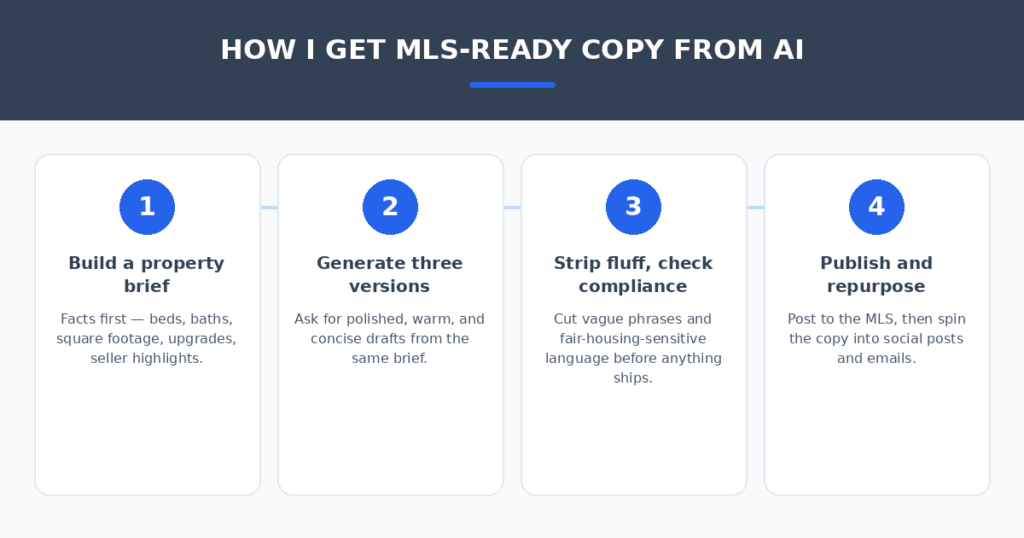
The tool matters less than the brief. Four habits separated copy I’d publish from copy I’d rewrite:
- Feed it facts, not vibes. Beds, baths, square footage, renovations, seller-approved highlights — verified facts in, good copy out. Vague input gets vague output every time.
- Generate three versions. Ask for polished, warm, and concise from the same brief. The best line is usually in version two — cherry-pick across drafts.
- Strip the fluff and check fair housing. Cut “charming,” “great neighborhood,” and anything hinting at protected-class preferences. Fair-housing compliance is always your job, no matter what the tool wrote.
- Rewrite the hook yourself. The opening line does the heavy lifting. Two sentences in your own voice on top of an AI draft beats a fully AI listing — your market knowledge is the differentiator.
Listing copy is just the start — if you also need responses that convert, the follow-up matters as much as the ad. And if your brokerage runs its own site, AI chatbots for small business websites can answer buyer questions at midnight while you sleep.
FAQ
Will buyers know my listing was written by AI?
Not if you do the final pass. Generic AI copy has tells — “nestled,” “boasts,” “don’t miss this gem.” Rewrite the opening and cut the clichés, and the description reads like you on a good day.
Do AI listing tools comply with fair housing laws?
The tools don’t guarantee compliance — you do. Avoid language describing who should live there (families, young professionals, “walking distance to church”) and stick to the property itself. When in doubt, have your broker review the copy.
Can AI write in a luxury tone versus a starter-home tone?
Yes — this was one of the clearest wins in testing. Tools with tone presets (ListingAI, ListWorks PRO) produced genuinely different voices for luxury versus family-friendly briefs. With ChatGPT or Claude, name the tone and the target buyer in your prompt.
How long should an MLS listing description be?
Most MLS systems cap descriptions around 1,000 characters, but the sweet spot is 150–250 words: enough to sell the story, short enough to read on a phone. All six tools handle length limits when you specify them.
Is the free route actually good enough?
For the description alone, yes — a structured prompt in ChatGPT or Claude matched the paid tools on copy quality in my test. Paid tools earn their fee on convenience: MLS formatting, batch generation, and the social/email extras.
My verdict
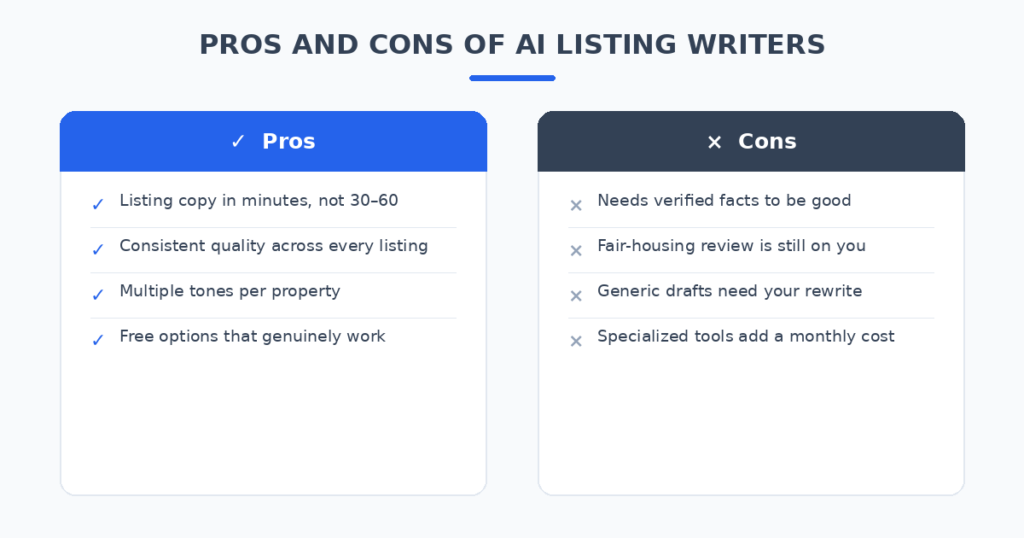
For most agents, ListingAI is the pick — the most publish-ready drafts, real MLS formatting, and pricing that a single extra listing covers. If you market every listing across social and email, ListWorks PRO replaces three tools. If you want the description done with the least editing, ListAssist surprised me. And if the budget is zero, ChatGPT or Claude with a structured prompt is genuinely competitive.
The blank MLS description field is a solved problem. Pick the tool that matches how many listings you carry, feed it verified facts, check every word for compliance — and spend the hours you save actually showing homes.
Related reading
- AI lead follow-up tools for real estate agents
- AI product description generators for Shopify
- AI social media post generators
Sources: National Association of Realtors