

Every Shopify store has the same graveyard: products with one-sentence descriptions — “High-quality cotton t-shirt. Available in blue.” — because writing 200 unique, SEO-friendly descriptions by hand takes weeks nobody has. And thin descriptions don’t just look lazy; they hurt search rankings and conversions — which is exactly why AI product description generators for Shopify stores have become essential.
AI product description generators promise to clear the backlog in a weekend: feed in product facts, get polished descriptions with keywords placed and bullets formatted. I spent three weeks testing that promise. I ran the same six products through six generators — from a simple t-shirt to a technical gadget — then judged the copy on whether it would make a stranger buy, not just fill a text field.
Here’s the honest version: the AI is a formatting and SEO machine and a mediocre storyteller. It will give you keyword-rich, well-structured copy fast — and if you publish it untouched, your store will sound like every other store using the same tool. The winners are the tools that make the human polish step easy.
How I tested these AI product description generators for Shopify stores
To keep it fair, every tool got the identical input: six products with the same fact sheets (materials, sizes, use cases, target buyer). I scored each on five things:
- Copy quality: Does it sound like a brand, or a template?
- SEO handling: Are keywords placed naturally in titles and copy?
- Shopify fit: Does it sync to the store, or is it copy-paste?
- Bulk capability: Can it handle a 200-SKU catalog, not just one product?
- Honest pricing: What does a small store actually pay?
The 6 tools I tested
1. Shopify Magic — the best free starting point
Shopify’s own Magic (Sidekick) generates product descriptions right inside the product editor — no app install, no subscription, no copy-paste. For a store already on Shopify, it’s the zero-friction option: click generate on any product page, get a draft with the tone you pick.
In my test the drafts were clean and structurally sound — proper paragraphs, feature bullets, sensible keyword use. The weakness: they read like Shopify wrote them, because Shopify did. Every store using Magic gets the same register. Still, for clearing a backlog for free, it’s the obvious first move.
Pricing: Free with any Shopify plan.
| Pros | Cons |
|---|---|
| Free and built into the editor | Same voice as every other store |
| Zero setup, zero learning curve | Limited tone and style control |
| Good structure and keyword basics | No bulk generation across catalog |
Best for: New stores clearing their first backlog for free.
2. Describely — the best for bulk catalog work
Describely is built for the catalog problem specifically: bulk-generate titles, descriptions, tags, and meta data for hundreds of products, with native Shopify connectors that sync copy straight into your store. It also audits existing descriptions and enriches product data from multiple sources.
In my test it was the only tool that treated six products as the start of a workflow, not six separate tasks — rulesets for tone, bulk runs, content audit on what you already have. The $0.75/product pay-as-you-go option is perfect for a one-time backlog clear without a subscription.
Pricing: Starter $28/month (50 products, unlimited generations); pay-as-you-go $0.75/product.
| Pros | Cons |
|---|---|
| Bulk generation with Shopify sync | No free plan |
| Content audit finds weak listings | Overkill for under ~30 products |
| Pay-per-product option for one-offs | Copy still needs your voice pass |
Best for: Stores with 50+ products and a real backlog.
3. CopyMonkey — the best for keyword-driven listings
CopyMonkey is built around search mechanics, not just pretty copy: it places the keywords shoppers actually search for into titles, bullets, and descriptions, and audits listings against competitor best practices. It started with Amazon sellers but now bulk-generates for Shopify catalogs too.
My test copy was the most SEO-deliberate of the bunch — every description had the target keywords in the right fields without stuffing. The tradeoff: the copy reads optimized rather than inspired. Pair it with a brand-voice pass and it’s the strongest conversion combo here.
Pricing: Starter from around $33/month billed annually ($49 month-to-month).
| Pros | Cons |
|---|---|
| Keyword placement done properly | Copy reads optimized, not inspired |
| Competitor insights built in | Amazon roots show in the templates |
| Bulk import for Shopify catalogs | Needs a human voice pass |
Best for: Stores competing on search where keywords win sales.
4. Jasper — the best for brand voice at scale
Jasper’s argument is brand voice memory: teach it how your store sounds once, and all 200 descriptions come out in that register. For a brand with a distinct personality — playful, premium, technical — that consistency across the catalog is worth real money.
In my test Jasper produced the most distinctive copy — the only tool where the six descriptions felt like they came from one brand. The catch is price: it starts around $39–49/month and it’s a general marketing tool, so you’re paying for capabilities beyond descriptions.
Pricing: From around $39–49/month (Creator, billed annually).
| Pros | Cons |
|---|---|
| Most distinctive, on-brand copy | Priciest for this single job |
| Voice learned once, applied everywhere | General tool, not Shopify-native |
| Strong for marketing copy beyond products | Copy-paste into Shopify manually |
Best for: Brands where voice is the differentiator.
5. Copy.ai — the best free-to-start generalist
Copy.ai’s generous free tier makes it the low-risk way to test AI descriptions: generate freely, see if the output beats your current copy, upgrade only if it does. The paid tiers add unlimited brand voices — handy if you run multiple stores.
My test output sat in an uncanny valley: structured enough to look professional, template-y enough that experienced buyers notice. More editing required than the marketing suggests — but for a free starting point with volume, it’s honest value.
Pricing: Free tier; paid from around $29/month billed annually.
| Pros | Cons |
|---|---|
| Generous free tier to test with | Output needs more editing than expected |
| Unlimited brand voices on paid | Template feel on product copy |
| Fast for high-volume drafting | No Shopify sync |
Best for: Stores testing AI copy before committing money.
6. ChatGPT or Claude — the free DIY route
The free route works if you engineer the prompt: “Write a 120-word product description for a men’s merino wool sweater ($89, navy/grey, machine washable) for a premium-but-friendly outdoor brand. Include an SEO-friendly title under 60 characters, 4 benefit bullets, no hype words.” That prompt got me better copy than most tools’ defaults.
What you don’t get: bulk runs, Shopify sync, or keyword research. This is the craft approach — best for hero products and small catalogs where each description deserves fifteen minutes. For 200 SKUs, use Describely and save this for the top 20.
Pricing: Free; Plus tiers around $20/month.
| Pros | Cons |
|---|---|
| Free, and great with a good prompt | No bulk, no sync, no keyword data |
| Full control over every word | Slow for large catalogs |
| Best for hero products | You verify every spec yourself |
Best for: Hero products and small catalogs done with care.
Quick comparison
(Pricing changes often — treat these as ballparks and check current plans before deciding.)
| Tool | Starting price | AI strength | Shopify sync | Bulk catalog | Best for |
|---|---|---|---|---|---|
| Shopify Magic | Free | Clean native drafts | Yes, built-in | No | Free start |
| Describely | $28/mo or $0.75/product | Bulk + audit | Yes | Yes | Large catalogs |
| CopyMonkey | ~$33/mo | Keyword optimization | Via import | Yes | SEO competition |
| Jasper | ~$39/mo | Brand voice | No | Manual | Distinctive brands |
| Copy.ai | Free / ~$29/mo | Volume drafting | No | Manual | Free testing |
| ChatGPT/Claude | Free / $20/mo | Prompt-crafted copy | No | No | Hero products |
How to get descriptions that actually sell
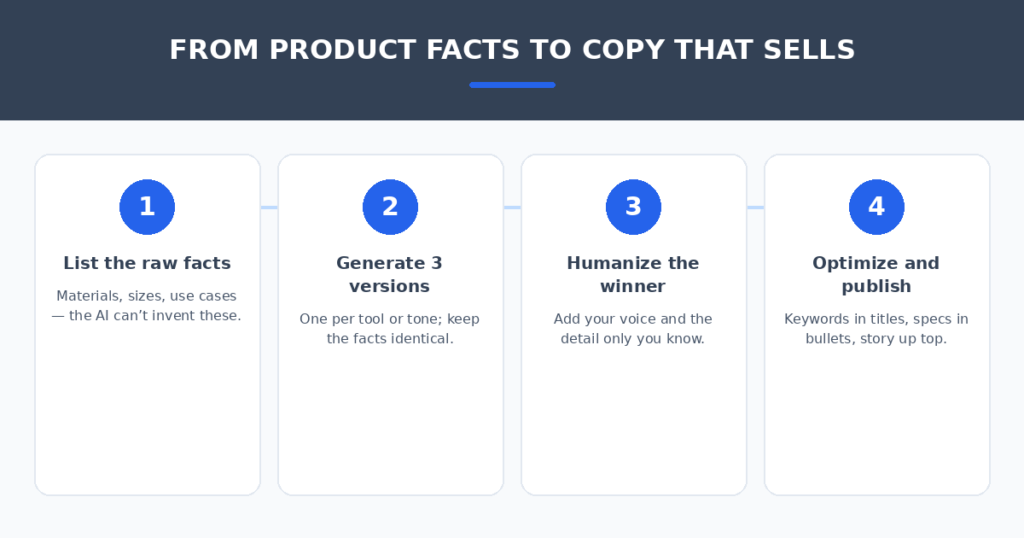
The tool matters less than the input and the polish. Four habits made the biggest difference in my tests:
- Feed it facts, not adjectives. “Merino wool, 220gsm, machine washable, made in Portugal” beats “premium quality sweater.” The AI cannot invent your specs — and invented specs become returns.
- Generate three, publish one. Run the same product through two or three tools (or three prompts) and keep the best sentences from each. Frankenstein copy beats any single draft.
- Humanize the winner. Add the one detail only you know — why you sourced it, who it’s for, the thing customers always ask about. That single sentence is what separates your listing from the template.
- Verify every claim. AI confidently invents materials, dimensions, and care instructions. Check specs against the real product before publishing — a wrong “machine washable” costs you a chargeback.
Great descriptions bring traffic — make sure the visit converts. AI chatbots for small business websites answer product questions and recover abandoned carts while you sleep.
FAQ
Will AI product descriptions hurt my SEO?
No — thin or missing descriptions hurt far more. Google penalizes duplicate and empty content, not AI-assisted content. Unique, keyword-aware descriptions for every product are a net win. Just make sure each one is actually unique — publishing the same AI draft across similar products creates the duplicate-content problem you’re trying to solve.
Can AI write descriptions for technical or niche products?
Yes, with better input than usual. Technical products need spec sheets, use cases, and compatibility details in the prompt — the AI assembles them well but can’t research them. For highly specialized B2B products, expect to do more editing than for consumer goods.
How long should a Shopify product description be?
100–200 words for most products: a short story-driven opener, benefit bullets, then specs. Google needs enough text to rank the page; shoppers need the bullets to decide. Put the buying reasons above the fold and the specs below.
Should I use the same AI tool for all my products?
For consistency, yes — one tool with one brand voice keeps the catalog coherent. The exception: use your best tool (or hand-crafting) for your top 20 hero products and bulk tools for the long tail. Heroes earn the effort.
Is the free Shopify Magic enough?
For a new store with under 30 products: honestly, yes — with a human polish pass on each. You’ll outgrow it when the catalog hits triple digits (no bulk), when you need real keyword strategy (use CopyMonkey), or when brand voice matters across everything (use Jasper).
My verdict
For most Shopify stores, start with Shopify Magic — it’s free and already in your editor. When the catalog grows past what you can polish by hand, Describely is the bulk specialist built for exactly this job. If search competition is fierce, CopyMonkey places keywords like nothing else. And your top 20 products deserve the ChatGPT craft treatment with a sharp prompt.
The description graveyard is a solved problem. Feed the AI your facts, generate three versions, add the sentence only you can write — and spend the weekend you
save on products worth describing.
Related reading
Sources: Shopify