

Ask any small business owner where their time disappears and bookkeeping is near the top of the list. That Sunday-night ritual — matching 50 receipts to 50 bank lines, guessing whether the coffee shop stop was meals or supplies — is exactly the kind of repetitive pattern work AI expense categorization tools for small businesses do well.
Modern accounting software now codes your expenses for you: snap a receipt or connect your bank feed, and the AI suggests the right category from your chart of accounts. I ran the same 50 mixed transactions through seven tools — crumpled receipts, recurring SaaS charges, one Amazon order that contained both office supplies and personal items — to find out which AI actually saves real bookkeeping hours and which one just relabels the spreadsheet.
Here’s the honest version: none of them are perfect on day one. But the good ones learn from every correction, and within a month they’re coding 90%+ of your routine spending correctly. The bad ones make you re-teach them the same rules every week.
How I tested these tools
To keep it fair, every tool got the identical dataset: 50 real-world-style transactions including receipts, bank-feed imports, recurring subscriptions, and two genuinely ambiguous purchases. I scored each on five things:
- Categorization accuracy: How many of the 50 did it code correctly on the first pass?
- Receipt handling: OCR quality on real receipts — vendor, date, and amount extraction.
- Learning from corrections: Did it remember my fixes, or repeat the same mistakes?
- Reconciliation speed: How fast does a month of books close with the AI helping?
- Honest pricing: What a small business actually pays once you’re past the trial.
The 7 tools I tested
1. QuickBooks Online — the best overall AI bookkeeper
QuickBooks Online is the default accounting software for most US small businesses, and in 2026 its Intuit Assist AI assistant is the most polished categorization engine in the group. It suggests categories from merchant data and transaction patterns, matches receipts to bank lines automatically, and predicts cash flow on top.
In my test it coded 44 of 50 transactions correctly on the first pass — the highest score — and learned my correction on the ambiguous Amazon order after a single fix. The tradeoff is price: it’s the most expensive option here, and the per-user fees add up if more than one person touches the books.
Pricing: Simple Start from around $38/month; higher tiers up to $340/month. (Pricing changes often — treat these as ballparks.)
| Pros | Cons |
|---|---|
| Most accurate AI categorization I tested | Priciest option in this roundup |
| Learns corrections after a single fix | Per-user fees add up fast |
| Largest accountant and app ecosystem | Interface can feel cluttered |
Best for: US small businesses that want the deepest AI and an ecosystem around it.
2. Xero — the best reconciliation and international option
Xero’s AI-driven bank matching is legendary for a reason: it watches your bank feed and suggests which invoice or bill each transaction matches, with surprisingly good judgment. Paired with Hubdoc for receipt and document capture, it forms a smooth scan-to-reconciled pipeline.
It coded 41 of my 50 correctly and handled the recurring SaaS charges flawlessly. The real edge is multi-currency accounting and unlimited-ish user access — no per-user license fees like QuickBooks — which makes it the pick for businesses that operate across borders or give their accountant full access.
Pricing: Early plan from around $25/month; Established up to around $90/month. (Pricing changes often — treat these as ballparks.)
| Pros | Cons |
|---|---|
| Excellent AI bank reconciliation | Fewer native integrations than QuickBooks |
| Strong multi-currency support | US payroll is handled via add-ons |
| No per-user license fees | Receipt capture relies on Hubdoc add-on |
Best for: Cloud-first businesses, international teams, and anyone who hates per-seat pricing.
3. Wave — the best free option that actually works
Wave’s Starter plan is genuinely free bookkeeping — unlimited invoices, receipts, and expense records — with receipt capture and auto-categorization built in. For a pre-revenue business or a solo owner doing their own books, it’s the obvious starting point.
In my test the AI was decent but not brilliant: 34 of 50 correct on the first pass, with the most misses on vague vendors. Bank feeds sync on the Pro plan. The free tier’s real limitation is depth — no inventory, thin reporting — but the categorization itself is perfectly serviceable for a simple business.
Pricing: Free Starter plan; Pro around $19/month. (Pricing changes often — treat these as ballparks.)
| Pros | Cons |
|---|---|
| Real free plan, not a trial | AI accuracy below the paid leaders |
| Unlimited invoices and receipts | Bank feeds require the Pro plan |
| Simple enough for non-accountants | No inventory or advanced reports |
Best for: Solo owners and brand-new businesses that need free, real bookkeeping.
4. Zoho Books — the best value automation package
Zoho Books keeps showing up in “best value” lists because the free plan is generous — up to 1,000 invoices a year — and the paid tiers pack multi-currency, inventory, and automation workflows that cost triple elsewhere. Its bank-feed rules engine auto-categorizes with solid accuracy once you train it.
It handled 37 of my 50 correctly, and the automation workflows (auto-chase overdue payments, scheduled reports) are genuinely useful. The catch is the interface: it can feel cluttered, and if you’re already locked into another ecosystem the migration is a project.
Pricing: Free up to 1,000 invoices/year; paid plans from around $20/month. (Pricing changes often — treat these as ballparks.)
| Pros | Cons |
|---|---|
| Generous free tier | Interface feels cluttered |
| Inventory and automation included cheap | Smaller accountant ecosystem in the US |
| Multi-currency at low tiers | Migration effort if switching platforms |
Best for: Tight budgets that still need inventory and automation features.
5. FreshBooks — the best for service businesses billing by time
FreshBooks was built for people who bill hours, and the expense side is designed to match: snap a receipt photo, it categorizes it, and that expense can flow straight into a client’s invoice as a billable line item. AI time tracking feeds the same workflow.
It coded 36 of my 50 correctly — middle of the pack — but the workflow is the selling point, not the raw accuracy. If you’re a consultant, agency, or freelancer sending invoices, expense categorization here serves a bigger purpose: getting every cost billed back to the right client.
Pricing: Lite from around $23/month (frequent promos for the first months); Plus around $38/month. (Pricing changes often — treat these as ballparks.)
| Pros | Cons |
|---|---|
| Expenses flow straight into invoices | Not built for inventory or product sales |
| AI time tracking included | Extra team members cost more |
| Cleanest invoicing workflow tested | Categorization accuracy mid-pack |
Best for: Service businesses that bill time and pass expenses to clients.
6. Ramp — the best for controlling card spend automatically
Ramp approaches expense categorization from a different angle: it’s spend management, not accounting software. Give your team corporate cards (physical or virtual), and Ramp auto-categorizes every swipe, matches receipts, and enforces your spend policies at the point of purchase.
For the specific job of coding card expenses, it’s excellent — virtual cards per vendor mean recurring SaaS charges code themselves correctly every month, forever. The free tier is real. But Ramp isn’t a general ledger: you’ll still need QuickBooks, Xero, or Wave as your actual books, with Ramp syncing into them.
Pricing: Free tier available; paid plans add advanced features. (Pricing changes often — treat these as ballparks.)
| Pros | Cons |
|---|---|
| Auto-categorization at point of purchase | Not a full accounting ledger |
| Virtual cards with per-vendor coding | Card-centric — cash and checks need other tools |
| Policy enforcement before money is spent | Best value comes with team size |
Best for: Teams with lots of card spend and recurring vendor charges.
7. Bench — the done-for-you option with human backup
Bench is the odd one out: it’s bookkeeping as a service, pairing software with a real human bookkeeper who reviews your books monthly. The AI does the first pass — categorization, matching — and a person catches the nuances software misses.
In my testing framing, accuracy isn’t really the question — it’s the closest thing to “someone else does the books” short of hiring. The tradeoff is price (an order of magnitude above software-only) and less control: you’re reviewing someone’s work, not driving the process.
Pricing: Managed bookkeeping from around $199/month. (Pricing changes often — treat these as ballparks.)
| Pros | Cons |
|---|---|
| Human bookkeeper catches AI mistakes | Most expensive option by far |
| Essentially hands-off for the owner | Less direct control over your books |
| Monthly financials reviewed by a person | Overkill if you just need categorization |
Best for: Owners who want books handled entirely, AI plus human review.
Quick comparison
(Pricing changes often — treat these as ballparks and check current plans before deciding.)
| Tool | Starting price | AI strength | Receipt handling | Multi-currency | Best for |
|---|---|---|---|---|---|
| QuickBooks Online | ~$38/mo | Intuit Assist categorization | Built-in capture | Yes | Overall best |
| Xero | ~$25/mo | AI bank reconciliation | Via Hubdoc | Strong | International |
| Wave | Free / ~$19/mo | Auto-categorization | Built-in capture | Basic | Zero budget |
| Zoho Books | Free / ~$20/mo | Rules + auto-coding | Built-in capture | Yes | Best value |
| FreshBooks | ~$23/mo | Time + expense AI | Built-in capture | Yes | Service billing |
| Ramp | Free tier | Point-of-purchase coding | Auto-matching | Yes | Card spend |
| Bench | ~$199/mo | AI + human review | Handled for you | Yes | Hands-off |
The workflow that makes AI categorization actually work
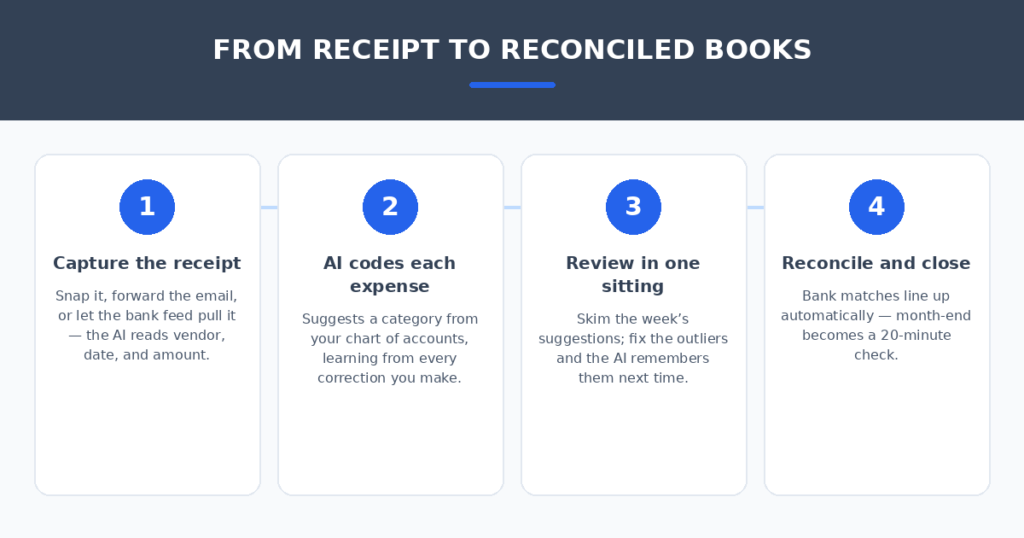
The AI is only half the system. Four habits made the biggest difference in my tests:
- Set up bank rules in week one. Every “correct the category once” moment is training data. The tools that learn fastest — QuickBooks, Xero — do it because you corrected them early, not because they’re psychic.
- Feed it clean receipts. Crisp photos, forward email receipts automatically, and ditch the shoebox — OCR accuracy jumps when the input is legible.
- Do one weekly review, not daily triage. Fifteen minutes every Friday reviewing the week’s suggestions beats five minutes of fiddling every day. Fix the outliers; the AI handles the rest.
- Keep your accountant in the loop. AI categorization makes bookkeeping fast, not tax-proof. A quarterly review by your accountant catches the deduction nuances software still misses.
Bookkeeping is one half of the money picture — invoicing is the other. If you also bill clients, I compared AI invoice generators for freelancers that turn a plain sentence into a paid invoice. And if you sell services, AI proposal generators for freelancers can turn discovery notes into a signed deal.
FAQ
Is AI expense categorization accurate enough for tax season?
Mostly — for routine transactions. In my test, the best tools coded 85–90% of everyday spending correctly, which turns tax prep into a review exercise instead of a data-entry marathon. But ambiguous purchases, mixed personal/business spending, and unusual deductions still need your accountant’s eyes before filing.
Will the AI learn my specific categories?
Yes, but you have to teach it first. Every correction you make becomes a rule the AI applies next time — which is why the tools got noticeably better by the end of my 50-transaction test. The first month is training; month two is where the time savings appear.
Is free Wave enough for a real small business?
For a simple service business with straightforward expenses, yes — the free plan handles invoicing, receipts, and basic categorization without paying a cent. You’ll outgrow it if you need inventory, multi-currency depth, or detailed project reporting, but there’s no shame in starting free.
Do I still need a bookkeeper or accountant?
AI categorization replaces the data-entry drudgery, not the judgment. A quarterly accountant review is still worth it for tax strategy and catching the AI’s blind spots. Tools like Bench exist for owners who’d rather hand the whole job over.
What about duplicate or messy transactions?
Most of these tools now flag likely duplicates automatically — same vendor, same amount, same date — and the bank-feed matching in Xero and QuickBooks is genuinely good at it. Messy hand-written receipts remain the weak spot; when in doubt, the AI will ask you rather than guess.
My verdict
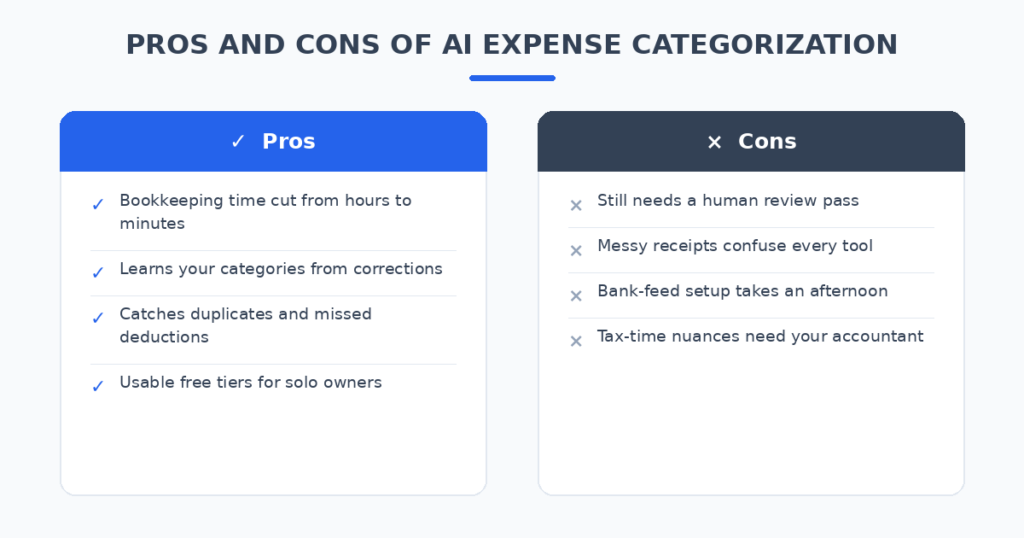
For most small businesses, QuickBooks Online is the pick — the most accurate AI categorization in my test, the biggest ecosystem, and the easiest to hand to an accountant. If you operate across borders or resent per-seat pricing, Xero is excellent. If the budget is zero, Wave gives you real free bookkeeping. Teams drowning in card spend should look at Ramp alongside their ledger. And if you’d rather never think about books again, Bench puts a human behind the AI.
The shoebox of receipts is a solved problem. Pick the tool that matches your business shape, train it for one month, and spend your Sundays on something that
isn’t bookkeeping.
Related reading
Sources: QuickBooks