

Zapier’s free plan gives you 100 tasks a month — which is exactly why free zapier alternatives for small businesses have become so popular. One decent lead-capture workflow — form to CRM to email to Slack — burns through that in a busy week, and then the meter starts running: every single step of every automation costs a task. Multi-step workflows firing dozens of times a day can push a bill from $30 to $300 before you notice.
That’s the gap these seven tools fill. I rebuilt the same 5 workflows in each one — lead capture, order notifications, weekly reports, CRM sync, and an AI-enriched routing flow — and judged them on how much real work their free tier does, how deep the logic goes, and whether the pricing stays predictable when you scale.
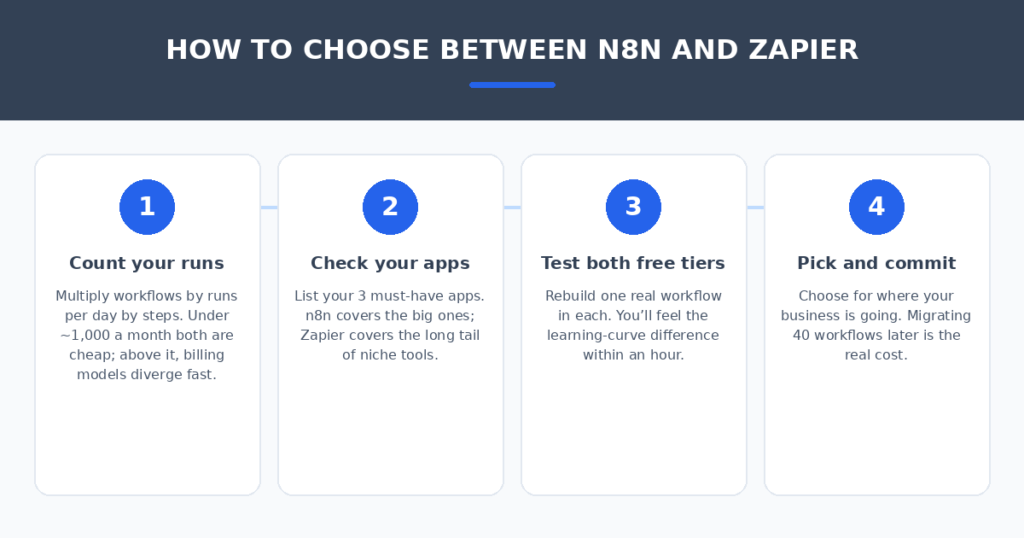
Here’s the honest version: Zapier still has the biggest app library (9,000+ integrations), and nothing here fully matches that. But for the automations most small businesses actually run, several of these do the same job free — or at a fraction of the price.
How I tested these tools
To keep it fair, every tool got the identical battery of five workflows, rebuilt from scratch. I scored each on five things:
- Free-tier generosity: How many real runs per month before you hit a wall?
- Multi-step logic: Branching, filters, data formatting — the stuff Zapier charges extra for.
- Ease of rebuilding: How fast a Zapier user can recreate a workflow from scratch.
- Error handling: What happens when a step fails at 2am?
- Honest pricing: What you actually pay once the free tier isn’t enough.
The 7 tools I tested
1. Make — the best free cloud tier
Make’s free plan gives you 1,000 operations a month, forever — no trial clock — and its visual scenario builder handles branching logic, filters, and data formatting that Zapier reserves for paid plans. At equal volumes, Make runs roughly 3 to 5 times cheaper than Zapier.
In my tests, all five workflows rebuilt cleanly, and the visual canvas made complex branching genuinely easier to reason about. The tradeoff: a steeper learning curve than Zapier’s simple trigger-action flow, and about 1,000+ integrations versus Zapier’s 9,000 — so verify your key apps are supported before migrating.
Pricing: Free for 1,000 ops/month; paid plans from around $9/month. (Pricing changes often — treat these as ballparks.)
| Pros | Cons |
|---|---|
| Generous permanent free tier | Learning curve on the visual builder |
| Branching and logic built in | Smaller app library than Zapier |
| 3–5x cheaper at equal volume | No automatic Zap migration |
Best for: Small businesses that want a managed cloud tool with a real free tier.
2. n8n — the best self-hosted option
n8n is the power user’s pick: open-source under a fair-code license, 400+ integrations, native AI nodes (ChatGPT, Claude, even local models), and pricing per execution instead of per step. A 5-step workflow costs one execution on n8n versus five tasks on Zapier — that billing difference alone can cut costs 80%+.
Self-hosting is genuinely free beyond a $5–20/month VPS, and your data never leaves your server — a big deal for privacy-conscious businesses. The catch: you (or someone technical) have to run and update the server, and the node library is a fraction of Zapier’s catalog.
Pricing: Self-hosted free (+ server); cloud from around €20/month for 2,500 executions. (Pricing changes often — treat these as ballparks.)
| Pros | Cons |
|---|---|
| Truly free when self-hosted | You maintain the server yourself |
| Per-execution billing, not per-step | Smaller integration library |
| Your data stays on your server | Needs technical comfort |
Best for: Technical teams that want full control and the lowest possible cost.
3. Pabbly Connect — the most predictable pricing
Pabbly Connect’s pitch is simple: flat-rate pricing instead of task-metering anxiety. Plans start around $19/month with generous task counts, and there’s a $249 one-time lifetime deal option that eliminates the subscription entirely. A free plan exists for testing.
The builder is Zapier-like enough that my five workflows rebuilt in about an hour each. The free tier is more limited than Make’s, and the integration library is smaller, but for businesses that know their volume, the flat rate means the bill never surprises you.
Pricing: Free plan; paid from around $19/month flat-rate; $249 one-time lifetime option. (Pricing changes often — treat these as ballparks.)
| Pros | Cons |
|---|---|
| Flat-rate, no meter anxiety | Free tier is modest |
| Lifetime deal option exists | Fewer integrations than Make |
| Familiar Zapier-like builder | Smaller community |
Best for: Businesses that want a fixed automation bill every month.
4. Activepieces — the friendliest open-source option
Activepieces is open-source and MIT-licensed, which matters if you care about truly free software. It’s simpler than n8n — closer to Zapier’s approachability — with a growing library of pieces (integrations) and a free cloud tier for teams that don’t want to self-host.
My test workflows rebuilt quickly, and the interface is the least intimidating of the open-source options. It’s younger than the competition, so expect a smaller integration catalog and occasional rough edges — but for standard lead/sales/notification automations, it covered everything.
Pricing: Self-hosted free; free cloud tier; paid plans from around $25/month. (Pricing changes often — treat these as ballparks.)
| Pros | Cons |
|---|---|
| True open-source (MIT license) | Youngest ecosystem here |
| Easier to learn than n8n | Smaller integration catalog |
| Free cloud tier available | Occasional rough edges |
Best for: Non-technical teams that want open-source without the server hassle.
5. Relay.app — the best human-in-the-loop automation
Relay.app’s standout feature is built-in human approval steps: a workflow can pause, ask a person to approve or edit, then continue. That fills a real gap — most Zapier automations either run blindly or don’t run at all. Relay also offers AI-assisted steps for judgment calls.
The free tier is generous enough for testing and light use, and the builder is clean. The integration library is narrower than Make’s, and it’s a younger company — but for workflows where a human needs to eyeball the output before it goes out, nothing else here does it as naturally.
Pricing: Free plan; paid plans from around $9/month. (Pricing changes often — treat these as ballparks.)
| Pros | Cons |
|---|---|
| Human approval steps built in | Narrower integration library |
| Clean, modern builder | Younger platform, smaller community |
| AI-assisted workflow steps | Advanced users may hit ceilings |
Best for: Automations that need a human checkpoint before acting.
6. Zoho Flow — the best deal if you’re in the Zoho world
Zoho Flow is the automation layer for the entire Zoho suite — CRM, Books, Desk, Campaigns — and it’s priced for organizations, not seats: around $10.50/month for the whole org. If you already run Zoho apps, it’s the obvious connective tissue.
My five workflows rebuilt fine, and the Zoho-native triggers are deeper than anything third-party tools offer for Zoho apps. Outside the Zoho ecosystem it’s less compelling, but there’s a free plan for testing, and the paid tier is the cheapest org-wide option here.
Pricing: Free plan; Standard around $10.50/month per organization. (Pricing changes often — treat these as ballparks.)
| Pros | Cons |
|---|---|
| Cheapest org-wide pricing | Best value stays inside Zoho |
| Deep Zoho app integration | Third-party connectors are thinner |
| Free plan available | Interface lags the modern tools |
Best for: Businesses already running Zoho CRM, Books, or Desk.
7. Microsoft Power Automate — the best if you already pay for Microsoft 365
Power Automate is bundled into many Microsoft 365 business plans — which means you may already own a Zapier alternative and not know it. It covers the classic automation ground (email triggers, approvals, file moves, SharePoint lists) plus genuinely useful AI Builder features for document processing.
For a Microsoft-centric business, the integration with Teams, Outlook, and SharePoint is deeper than anything else here. The tradeoff: the third-party connector library is smaller than Zapier’s, the builder feels enterprise-y, and standalone pricing (around $15/user/month premium) isn’t cheap if it’s not already bundled.
Pricing: Bundled in many M365 plans; Premium from around $15/user/month. (Pricing changes often — treat these as ballparks.)
| Pros | Cons |
|---|---|
| You may already own it | Smaller third-party connector library |
| Deep Microsoft 365 integration | Enterprise-feeling builder |
| Strong approval workflows | Standalone pricing isn’t cheap |
Best for: Teams already on Microsoft 365 who haven’t checked their bundle.
Quick comparison
(Pricing changes often — treat these as ballparks and check current plans before deciding.)
| Tool | Free tier | Billing model | Integrations | Self-hostable | Best for |
|---|---|---|---|---|---|
| Make | 1,000 ops/mo | Per operation | 1,000+ | No | Free cloud tier |
| n8n | Self-hosted free | Per execution | 400+ | Yes | Full control |
| Pabbly Connect | Limited free | Flat rate | Growing | No | Predictable bills |
| Activepieces | Free cloud + self-host | Per task / flat | Growing | Yes | Easy open-source |
| Relay.app | Free plan | Per run | Narrow | No | Human approvals |
| Zoho Flow | Free plan | Per org | Zoho-deep | No | Zoho users |
| Power Automate | Bundled w/ M365 | Per user | Microsoft-deep | No | Microsoft shops |
How to switch without breaking your automations
Migration is manual — there’s no Zap-to-anything converter — but it’s straightforward if you do it in order:
- Start with one daily workflow. Migrate your most-run automation first (usually new lead → CRM → notification). One workflow, not all of them.
- Rebuild it step by step. Recreate the trigger, then each action, then add the branching logic most of these tools handle better than Zapier. Plan 30–60 minutes per workflow.
- Test with real data for a week. Run the new workflow alongside the old Zap and compare results daily — this is where you catch the edge cases.
- Cut over and monitor. Turn off the old Zap, then watch the new tool’s error dashboard for a month. Every platform here has one — use it.
Automation connects your whole stack — and the tools feeding those workflows matter too. If your business sends proposals, I compared AI proposal generators for freelancers that turn discovery notes into signed deals. And if you answer the same customer questions daily, AI chatbots for small business websites handle them around the clock.
FAQ
Is there a completely free Zapier alternative?
Yes, with a caveat. n8n and Activepieces are free to self-host with no execution caps — you only pay for the server (typically $5–20/month). For managed cloud tools, Make’s 1,000 free operations a month is the most generous permanent free tier. “Completely free” means either self-hosting or staying inside a free tier’s limits.
Why do small businesses leave Zapier?
Cost, almost always. Zapier’s per-task billing punishes multi-step workflows: the more steps you add, the faster the meter runs. Teams above roughly 750 tasks a month usually find Make, n8n, or Pabbly dramatically cheaper — and the alternatives often handle branching logic better too.
Can I migrate my Zaps automatically?
No — there’s no reliable automatic migration tool. You’ll rebuild each workflow manually, typically 30–60 minutes per workflow depending on complexity. The practical approach: migrate your highest-value workflows first and run both systems in parallel for a week.
Do these alternatives connect to my apps?
Probably, but check. Zapier’s 9,000+ app catalog is still the largest; Make has 1,000+, n8n 400+, and the rest are smaller. Before committing, search each tool’s app directory for your three most critical apps — that’s the make-or-break test.
Is Make really cheaper than Zapier?
At equal volumes, yes — typically 3 to 5 times cheaper. The math: Make bills per operation at a lower unit cost, and its free tier alone (1,000 ops/month) covers what Zapier’s free tier (100 tasks) can’t touch. The tradeoff is a steeper learning curve on Make’s visual builder.
My verdict
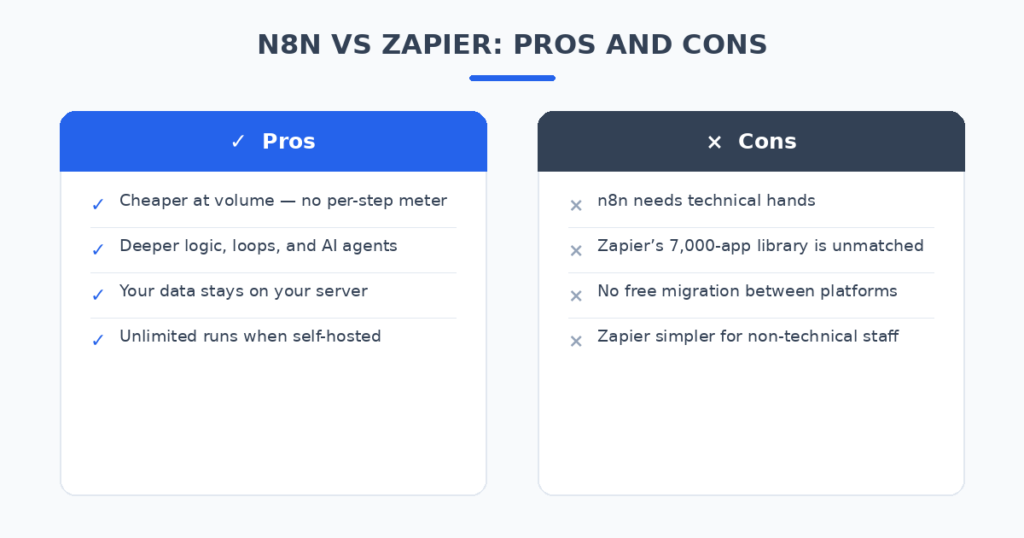
For most small businesses, Make is the pick — the 1,000-ops free tier is genuinely useful, the builder handles complex logic, and it’s a fraction of Zapier’s price at scale. Technical teams should look at n8n (self-hosted, per-execution billing, your data stays yours). If you want a fixed bill, Pabbly Connect’s flat rate is the calmest option. Zoho shops should check Zoho Flow, Microsoft shops should check what Power Automate is already bundled into their plan, and anyone needing human approval steps should try Relay.app.
Per-task billing is a solved problem. Pick the alternative that matches your stack, migrate one workflow this week, and stop watching the task counter.
Related reading
Sources: Zapier