

Every automation conversation in small business eventually lands on the same question — n8n vs Zapier for small business automation? One is the original no-code giant with 7,000+ integrations; the other is the open-source challenger that bills per workflow run instead of per step — and can run free on your own server.
I ran the same 5 automations on both platforms — lead capture, order notifications, weekly reports, CRM sync, and an AI-enriched routing flow — and did the pricing math at real volumes. This isn’t a roundup. It’s two contenders, side by side, judged on what actually decides the purchase: cost at scale, ease of use, app coverage, AI capability, and who controls your data.
How they differ: the one-table version
If you only have thirty seconds, this is the whole comparison:
| n8n | Zapier | |
|---|---|---|
| Billing model | Per execution (whole workflow = 1 unit) | Per task (each step = 1 task) |
| Self-hosting | Yes — free, unlimited | No — cloud only |
| Integrations | 400–500 native + HTTP for anything | 7,000+ |
| Learning curve | Medium–high (low-code) | Low (true no-code) |
| Free tier | Self-hosted free / cloud starter tier | 100 tasks/month |
| AI capability | Best-in-class (LangChain, agent nodes) | Good (Zapier Agents, AI actions) |
| Data control | Yours (self-hosted) | Passes through Zapier’s cloud |
| Best for | Technical teams, high volume | Non-technical teams, fast setup |
The two contenders
n8n — the self-hosted powerhouse
n8n (from Germany, 2019) is open-source under a fair-code license, which means you can run the full platform on your own $5–15/month VPS with no workflow or execution limits. The billing is the headline: a 5-step workflow running 1,000 times consumes 5,000 Zapier tasks but only 1,000 n8n executions. At 10,000 runs a month, that’s roughly $250–400 on Zapier Team versus about $10–15 self-hosted on n8n.
In my tests, n8n handled the most complex flow — branching lead routing with AI enrichment — better than Zapier, thanks to native LangChain agent nodes, loops, and JavaScript/Python code steps. The honest catch: 400–500 native integrations is a fraction of Zapier’s catalog (though the HTTP node covers anything with an API), and self-hosting means you maintain the server.
Pricing: Self-hosted free (+ ~$5–15/month VPS); cloud from around €20/month. (Pricing changes often — treat these as ballparks.)
| Pros | Cons |
|---|---|
| Dramatically cheaper at volume | Smaller native integration library |
| Full data control when self-hosted | You maintain the server yourself |
| Best-in-class AI and agent nodes | Steeper learning curve for non-technical staff |
Best for: Technical teams, high-volume automation, and anyone who wants their data on their own server.
Zapier — the no-code standard
Zapier (US, 2011) is the platform that defined the category: 7,000+ integrations, a genuinely simple trigger-action builder, and the long tail of niche US SaaS apps that nobody else has. A non-technical owner can build their first working Zap in under 30 minutes — no developer, no server, no docs rabbit hole.
In my tests, the simple workflows (notifications, basic syncs) were fastest to build on Zapier, and its AI agents and copilot features are solid. The honest catch is the meter: every step of every run costs a task, so multi-step workflows at real volume get expensive fast — and there’s no self-hosted escape hatch for your data.
Pricing: Free 100 tasks/month; paid from around $20/month; Team from ~$69/month. (Pricing changes often — treat these as ballparks.)
| Pros | Cons |
|---|---|
| Largest integration library by far | Per-task billing punishes multi-step workflows |
| Easiest builder for non-technical teams | Expensive at real volume |
| Mature support and ecosystem | Cloud-only — no data self-hosting |
Best for: Non-technical teams that need broad app coverage and the fastest possible setup.
The pricing math that actually matters
Per-task versus per-execution billing sounds abstract until you scale it. Here’s the same 5-step workflow at three volumes — ballparks based on 2026 plan pricing:
| Monthly runs | Zapier cost | n8n cloud cost | n8n self-hosted cost |
|---|---|---|---|
| 500 runs (2,500 steps) | ~$20–50/mo | ~€20/mo | ~$5–15/mo (VPS) |
| 5,000 runs (25,000 steps) | ~$100–200/mo | ~$50/mo | ~$10–15/mo (VPS) |
| 10,000 runs (50,000 steps) | ~$250–400/mo | ~$50/mo | ~$10–15/mo (VPS) |
The pattern is clear: at low volume the difference is small, and Zapier’s ease of use can easily justify it. The gap explodes as multi-step workflows run thousands of times — that’s exactly where n8n’s per-execution billing earns its keep.
Which wins for what
| Category | Winner | Why |
|---|---|---|
| Ease of use | Zapier | True no-code; a beginner ships a working automation in 30 minutes. |
| Cost at scale | n8n | Per-execution billing; self-hosting removes the meter entirely. |
| App coverage | Zapier | 7,000+ integrations vs 400–500; niche apps are Zapier-only. |
| Complex logic | n8n | Loops, branching, code steps, and replay/debugging built in. |
| AI and agents | n8n | LangChain nodes and agent tooling; Zapier’s AI is good but less deep. |
| Data control | n8n | Self-hosting keeps everything on your infrastructure. |
| Support and polish | Zapier | Mature support, docs, and the biggest template library. |
How to choose in 4 steps
Don’t pick on vibes. Run this decision sequence — it takes about an hour:
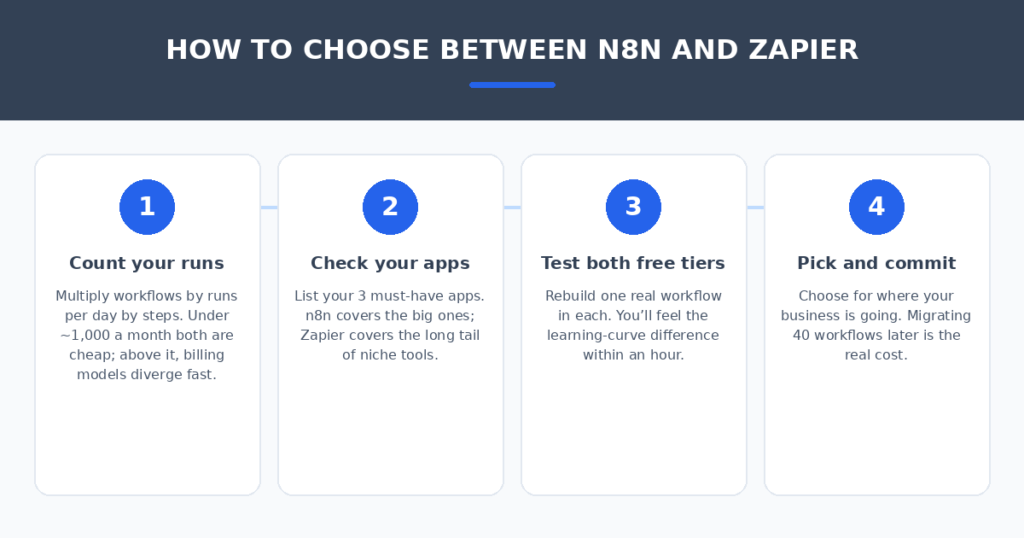
- Count your runs. Multiply workflows × runs per day × steps per workflow. Under ~1,000 runs a month, both are cheap and Zapier’s simplicity can win; above it, the billing models diverge fast.
- Check your three must-have apps. n8n covers the big platforms; Zapier covers the long tail. If even one critical app is Zapier-only, the decision may be made for you.
- Test both free tiers. Rebuild one real workflow in each. You’ll feel the learning-curve difference within an hour — that feeling is data.
- Pick for where you’re going. Migrating 40 workflows later is the real cost. Choose the platform that fits your 12-month trajectory, not just today’s three Zaps.
Automation is only as good as the tools it connects. If your workflows feed a sales pipeline, I compared AI proposal generators for freelancers that turn discovery notes into signed deals. And if you want to see how n8n stacks up against the broader field, I tested 7 free Zapier alternatives for small businesses on the same five workflows.
FAQ
Can n8n really replace Zapier for a small business?
For technical teams, yes — it covers most core automation workflows, bills per execution instead of per step, and self-hosts for free. The honest limits: a smaller native app library (400–500 vs 7,000+) and a real learning curve for non-technical staff. If your team lives in niche apps or nobody touches code, Zapier still wins on fit.
Is n8n actually free?
The software is free to self-host under its fair-code license — unlimited workflows and executions. You pay only for the server (typically $5–15/month on a small VPS) plus your time maintaining it. The cloud version is paid, from around €20/month.
How hard is it to switch from Zapier to n8n?
There’s no automatic migration — you rebuild each workflow manually, about 30–60 minutes per workflow. The practical path: rebuild your highest-volume workflow first (that’s where the savings are), run both in parallel for a week, then migrate the rest in priority order.
Which is better for AI-powered automations?
n8n, currently. Its LangChain-based agent nodes, tool-calling, and memory features are the most capable in this price class — you can build genuine AI agents inside workflows. Zapier’s AI features (agents, copilots, AI actions) are good and easier to use, but less deep for custom agent logic.
Does Zapier still make sense in 2026?
Yes — for non-technical teams running simple automations across many apps, Zapier’s ease of use and 7,000-app catalog remain unmatched. It stops making sense when multi-step, high-volume workflows push task consumption (and cost) past what n8n’s per-execution pricing charges. Many teams honestly run both.
My verdict
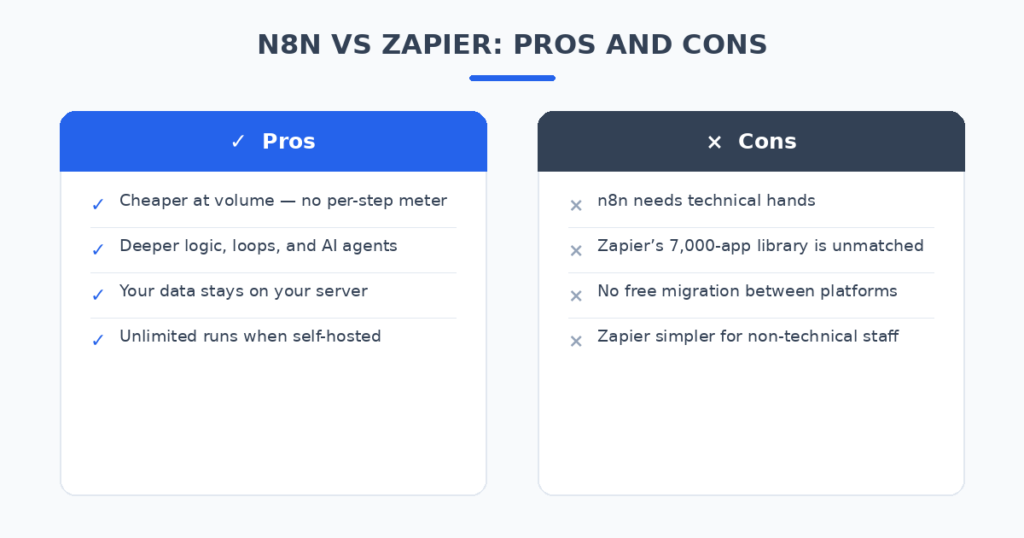
There’s no universal winner — there’s a right answer for your situation. Pick Zapier if your team is non-technical, your apps are niche, and your volumes are modest: you’ll be automated this afternoon. Pick n8n if you have someone technical, your workflows run thousands of times a month, or you want your data on your own server: the savings and control are real. And if you’re somewhere in between, test both free tiers with one real workflow — the hour you spend testing is worth more than any comparison article, including this one.
Automation lock-in is a solved problem. Count your runs, check your apps, test both — and stop paying per-step for workflows that should cost pennies.
Related reading
Sources: n8n