

Notion changed the deal in early 2026: full Notion AI now lives inside the Business plan, while Free and Plus accounts get only a strictly limited trial — a small, one-time pool of AI responses, not an ongoing monthly allowance. Once you burn through it, the cheapest path back is a paid seat — which is exactly why free alternatives to Notion AI are worth a look.
That’s why “free Notion AI alternative” searches keep climbing. I spent three weeks testing the free options on the three jobs people actually used Notion AI for — summarizing documents, drafting and rewriting, and organizing notes — to find what genuinely fills the gap.
Here’s the honest version: no single free tool replaces all of Notion AI at once. But split by task, the free stack is arguably better than what you’re losing. Pick by job, not by brand.
What Notion AI did (and what changed)
Notion AI was three things in one: a summarizer (condense long pages, ask questions about your docs), a writing assistant (draft, rewrite, change tone, translate), and an organizer (auto-generated tables of contents, action items, database autofill). It lived inside your notes, which was the whole convenience.
The workspace itself stays free — it’s specifically the AI layer that moved behind the paywall. So the replacement question is really: where do you get AI summarizing, AI writing, and smart organization for free?
The 6 free alternatives I tested
(Free tiers change — verify current limits before building your workflow around any of these.)
1. Google NotebookLM — the best free Notion AI replacement for summarizing
For the single most-used Notion AI job — summarizing and asking questions about your own documents — Google NotebookLM is free and arguably stronger than Notion AI ever was at it. Upload your documents, ask questions, get answers grounded in your sources with citations.
In my test it handled a 40-page PDF better than Notion AI did: the answers cited specific sections instead of summarizing vaguely. It’s the one free tool where the replacement is an upgrade, not a compromise.
Pricing: Free.
| Pros | Cons |
|---|---|
| Best-in-class document Q&A with citations | Not a notes app — research tool only |
| Completely free | Google account required |
| Stronger than Notion AI at this one job | No writing or workspace features |
Best for: Summarizing and interrogating your own documents — the top Notion AI use case.
2. ChatGPT or Claude (free tiers) — the best free Notion AI replacement for drafting
For Notion AI’s writing job — draft this, rewrite that, fix this tone — the free tiers of ChatGPT and Claude do the work. Paste your page content into the chat, ask for the rewrite, paste it back. It’s one extra copy-paste step versus the inline button, and the output quality is as good or better.
Claude is my pick for careful rewriting and tone work; ChatGPT for fast drafts and brainstorming. Both free tiers have usage limits, but for a few AI-assisted writing passes a day, they’re enough. If your business wiki feeds a client-facing website, pair this with AI chatbots for small business websites to answer questions from those same docs automatically.
Pricing: Free tiers; Plus/Pro tiers around $20/month if you outgrow them.
| Pros | Cons |
|---|---|
| Completely free for moderate use | Not inside your notes — copy-paste workflow |
| Better writing quality than Notion AI | Usage caps on free tiers |
| Two options tuned for different jobs | No access to your private docs |
Best for: Drafting, rewriting, and tone fixes — Notion AI’s writing job.
3. Obsidian — the best free home for notes you’ll own forever
Obsidian is a free (for personal use) notes app where everything lives as plain Markdown files on your own disk — no database, no lock-in, no subscription. It won’t replace Notion AI’s summarizer, but it replaces the part of Notion people were afraid to lose: a knowledge base that can’t be paywalled away from you.
The plugin ecosystem adds AI where you want it: community plugins connect your vault to AI models for search and summarization, and you keep full control of your data. The learning curve is steeper than Notion’s, but your notes are files you own — they work in any editor, forever.
Pricing: Free for personal use; Sync and Publish are paid add-ons (optional).
| Pros | Cons |
|---|---|
| Your notes are files you own — no lock-in | Steeper learning curve than Notion |
| Free for personal use | No built-in AI — plugins required |
| Huge plugin ecosystem | Sync across devices needs setup |
Best for: People who want a permanent, AI-extensible home for their notes.
4. Google Keep — the best free quick-capture replacement
If you used Notion AI for quick capture — dump a thought, have it cleaned up later — Google Keep is free, instant, and already on your phone. It’s not an AI tool and doesn’t pretend to be; it’s the capture half of the job, done simply.
Pair it with a free chatbot for the cleanup pass: capture in Keep, paste into ChatGPT or Claude for the summary or rewrite. Two free tools, one extra step, zero dollars.
Pricing: Free.
| Pros | Cons |
|---|---|
| Free and instant on every device | No AI features at all |
| Zero learning curve | Not a real knowledge base |
| Pairs well with free chatbots | Weak for long documents |
Best for: Quick capture and simple lists — the lightweight Notion AI habit.
5. Notion’s free workspace — the “stay put” option
Don’t overlook the obvious: Notion itself stays free to use as a workspace. Databases, pages, templates, collaboration — all still there. It’s only the AI layer that moved. If your notes, wikis, and project trackers already live in Notion, there’s no reason to migrate.
The practical setup: keep Notion as your free workspace, and do the AI work in NotebookLM and a free chatbot on the side. You lose the inline convenience; you keep everything else, including the one-time AI trial for small jobs.
Pricing: Free workspace; limited one-time AI trial; full AI requires Business plan.
| Pros | Cons |
|---|---|
| Keep your existing setup — no migration | AI only as a small one-time trial |
| Databases and collaboration stay free | Inline AI convenience is gone |
| Familiar, zero new learning | Full AI means paying for Business |
Best for: Existing Notion users who just need to replace the AI, not the workspace.
6. localmd — the open-source option where your notes stay yours
localmd is a free, open-source alternative for people who want an AI working on notes without moving them into someone else’s database. Your notes are plain Markdown files in a folder on your own disk; the app runs as a web page with no backend and no account — you only pay your model provider for the AI calls.
It’s not a Notion replacement in the team-collaboration sense: no shared databases, comments, or permissions. But if what you want is an AI that works on notes you own as files, this is exactly that — and the open-source price is right.
Pricing: Free and open-source; you pay only your model provider’s API costs.
| Pros | Cons |
|---|---|
| Free, open-source, no account | Technical setup — bring your own model key |
| Notes are plain files you fully own | No team collaboration features |
| AI works on your actual files | Newer project, smaller community |
Best for: Technical users who want AI on locally-owned notes.
Free alternatives to Notion AI: quick comparison
(Free tiers change — verify current limits before building your workflow around any of these.)
| Tool | Price | Replaces which Notion AI job | Biggest strength | Biggest tradeoff |
|---|---|---|---|---|
| Google NotebookLM | Free | Summarizing, doc Q&A | Cited answers from your sources | Not a notes app |
| ChatGPT / Claude | Free tiers | Drafting, rewriting | Better writing than Notion AI | Copy-paste workflow |
| Obsidian | Free | Organization, knowledge base | Files you own forever | Learning curve, no built-in AI |
| Google Keep | Free | Quick capture | Instant, zero friction | Not a knowledge base |
| Notion free workspace | Free | The workspace itself | No migration needed | AI trial is tiny |
| localmd | Free (open-source) | AI on owned files | No account, no lock-in | Technical setup |
How to replace Notion AI for free in 4 steps
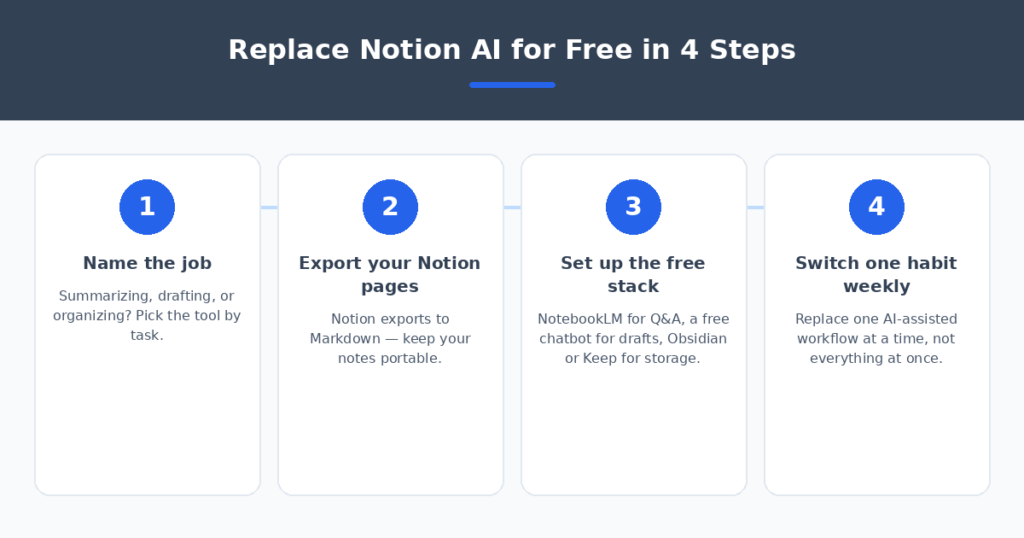
Don’t try to swap everything on day one. Four steps, one habit at a time:
- Name the job first. Summarizing, drafting, or organizing? The tool you need depends on the task — there’s no single free Notion AI clone.
- Export your Notion pages. Notion exports to Markdown, PDF, and HTML. Keep your notes portable so no future pricing change can hold them hostage.
- Set up the free stack. NotebookLM for document Q&A, a free ChatGPT or Claude account for drafting, Obsidian or Keep for storage. All free, all working today.
- Switch one habit a week. Replace your most-used AI workflow first, then the next. In a month, the paywall is irrelevant to your actual work.
If your notes feed a freelance business — client briefs, proposals, invoices — the admin side matters too. I compared AI invoice generators for freelancers that turn a sentence into a billable invoice.
FAQ
Is Notion AI still free?
Not really. Since early 2026, full Notion AI sits inside the Business plan. Free and Plus accounts get only a small, one-time pool of AI responses — a trial, not an ongoing allowance. The workspace itself remains free.
What is the best free alternative to Notion AI?
It depends on the job: Google NotebookLM for summarizing and questioning your documents, ChatGPT or Claude’s free tiers for drafting and rewriting, and Obsidian for organizing notes you own. No single tool does all three for free.
Can I keep using Notion without paying?
Yes — Notion’s free workspace is unchanged: pages, databases, templates, and collaboration all still work. Only the AI layer moved behind the paywall. Pair the free workspace with NotebookLM and a free chatbot and you lose very little.
Are these free tools safe for my data?
NotebookLM, ChatGPT, and Claude’s free tiers process your content on their servers — don’t paste sensitive client or business data into any of them. For private notes, Obsidian and localmd keep everything on your own disk.
Will I miss the inline AI convenience?
Honestly, a little — the copy-paste step between your notes and a chatbot is real friction. But most users report the better output quality (especially from NotebookLM and Claude) more than makes up for it within a week.
My verdict
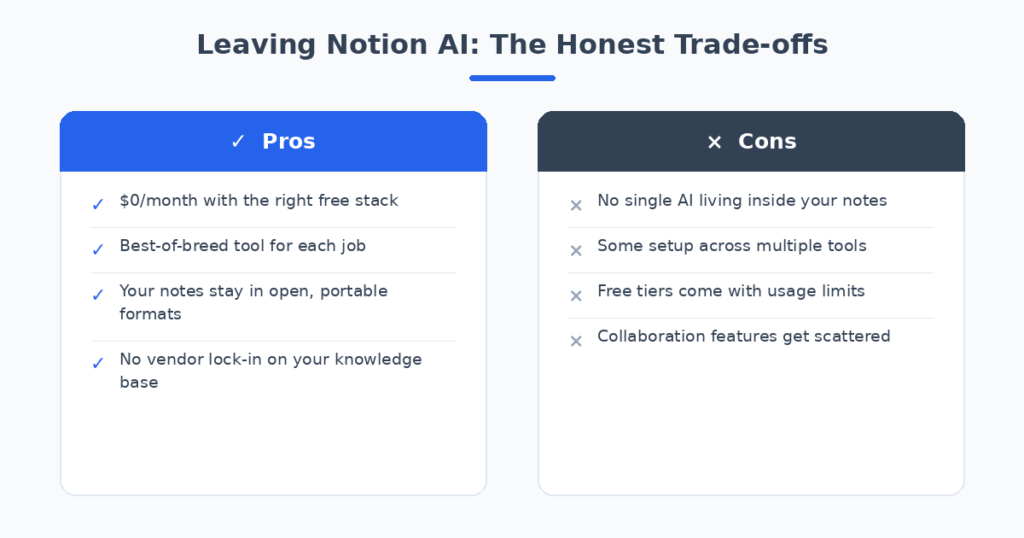
For most people, the winning stack is Google NotebookLM for summarizing, ChatGPT or Claude free for drafting, and Notion’s own free workspace for storage — zero dollars, and in two of the three jobs the output is better than what the paywall took away. If owning your notes matters to you, move them to Obsidian. And if you’re technical, localmd gives you AI on files no company controls.
Don’t pay for a Business seat just to get your summarize button back. Split the jobs, assemble the free stack, switch one habit a week — and let the paywall be someone else’s problem.
Related reading
- free AI writing tools for small business
- summarize Zoom meetings with AI
- AI essay grading tools for teachers
Sources: Notion