

Show notes are the task every podcaster postpones — which is exactly why AI show notes generators for podcasters have taken off. The episode is edited, the artwork is done, and then there’s a blank description field — so most shows publish with a vague two-line summary and a pile of unformatted links. Manual show notes take 1–2 hours per episode; most podcasters spend five minutes.
AI show notes generators promise the full package from your audio: episode summary, key takeaways, chapter markers, timestamps, and mentioned resources — in minutes. I ran the same 42-minute interview episode through five tools and judged each on whether the notes were something I’d actually publish, not just something that filled the field.
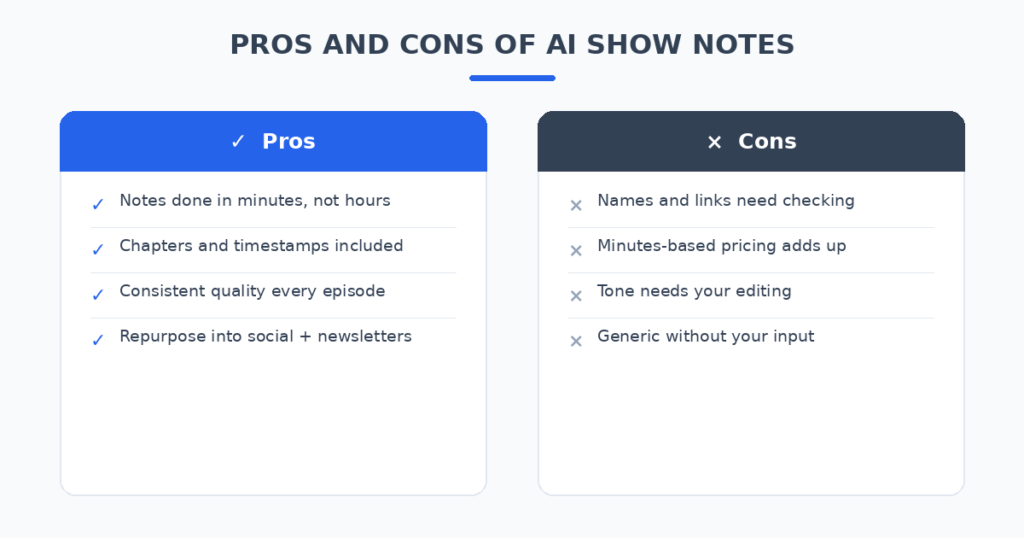
The honest result: the AI handles the structure brilliantly, but names, links, and claims need your eyes every time. The best tools cut a 90-minute post-production grind to a 15-minute review — which is exactly the difference between show notes that exist and show notes that don’t.
How I tested these tools
Same episode, same audio file everywhere: a 42-minute interview about independent publishing. I scored each tool on five things:
- Note quality: Would I publish these notes with minor edits?
- Chapters and timestamps: Are the markers accurate and useful?
- Resource extraction: Does it catch the books, tools, and people mentioned?
- Repurposing: Does it also produce social posts, clips, or newsletters?
- Honest pricing: What does a weekly podcaster actually pay?
The 5 tools I tested
1. Castmagic — the best all-round show notes and repurposing
Castmagic is the most complete content repurposing tool in this test: upload your episode and get show notes, timestamps, titles, blog posts, social content, and newsletter drafts in one batch. It’s built for podcasters who want every episode to become a week’s worth of content.
In my test the show notes were the strongest of the group — structured, scannable, and genuinely useful as listener-facing notes, not just SEO filler. The chapter markers were accurate to within seconds. The repurposing output (social posts, quote cards) needed the least editing of any tool here.
Pricing: Plans from around $29–99/month depending on hours and features.
| Pros | Cons |
|---|---|
| Best show notes quality in the test | $29+/month needs regular publishing |
| Full repurposing suite in one upload | More than you need for notes alone |
| Accurate chapters and timestamps | Names and links still need checking |
Best for: Podcasters who want every episode repurposed across all channels.
2. Podsqueeze — the best fast dedicated show notes
Podsqueeze is a dedicated show notes and repurposing tool with a simple promise: episode in, notes out, fast. Upload audio and get transcripts, show notes, timestamps, audiograms, and social clips without configuring anything.
My test confirmed the speed claim — notes in under five minutes from a 42-minute episode. The notes were clean and professional, slightly less rich than Castmagic’s but perfectly publishable. The Starter plan’s 160 minutes a month covers a weekly 30-minute show with room to spare.
Pricing: Starter $18/month (160 minutes, 10 clips); Pro $39/month (320 minutes).
| Pros | Cons |
|---|---|
| Fastest notes in the test | Notes less rich than Castmagic |
| Simple, no configuration | Minutes-based plans punish long episodes |
| Affordable Starter plan | Templates less flexible |
Best for: Weekly podcasters who want notes done fast at a fair price.
3. Descript — the best for transcript-first workflows
Descript starts from the transcript: edit your audio by editing text, then generate show notes, titles, and chapters from the same transcript. If you already edit in Descript, the show notes are a natural byproduct of your workflow rather than a separate step.
In my test the notes were solid — the advantage is accuracy from a corrected transcript. Since I’d already fixed the transcript during editing, the AI worked from clean text and the resource extraction was the most accurate here. The free plan’s 60 minutes a month lets you test the whole workflow.
Pricing: Free plan (60 minutes/month); Hobbyist $24/month ($16 annual); Creator $35/month.
| Pros | Cons |
|---|---|
| Most accurate resource extraction | Best value if you edit here too |
| Real free plan to test | Overkill if you only need notes |
| Notes inherit your transcript corrections | Learning curve for the editor |
Best for: Podcasters who already edit audio in Descript.
4. Swell AI — the best simple show notes generator
Swell AI keeps it simple: upload audio, get transcripts, show notes, articles, and clips. Speaker labeling, shareable transcript links, and multi-show management round out a tool that does the core job without ceremony.
My test showed dependable, middle-of-the-road notes — nothing flashy, nothing broken. The free Hobby tier (one upload a month) is genuinely useful for monthly shows, and the Studio plan’s 300 transcription minutes cover most weekly podcasts. A solid pick if you find the bigger tools overwhelming.
Pricing: Free Hobby tier (1 upload/month); Studio $29/month (300 minutes); Agency $49/month.
| Pros | Cons |
|---|---|
| Simple and dependable | Notes less distinctive than top picks |
| Usable free tier | Smaller feature set |
| Multi-show management | Clips need more editing |
Best for: Podcasters who want straightforward notes without a learning curve.
5. ChatGPT or Claude — the free DIY route
No subscription needed: paste your transcript into ChatGPT or Claude with a structured prompt — “Create show notes from this transcript: short episode summary, 5 key takeaways, chapter markers, mentioned resources, a guest bio, and a short app description. Do not invent links or claims.” — and get publishable notes in under a minute.
In my test the DIY notes matched the paid tools on structure. The gap: you handle transcription separately (Whisper, your host’s transcript, or Descript’s free tier), and there’s no chapter audio-linking or clip generation. But for notes alone, the free route is genuinely competitive.
Pricing: Free; Plus tiers around $20/month.
| Pros | Cons |
|---|---|
| Completely free | You supply the transcript |
| Total control over format | No chapters, clips, or publishing |
| Excellent note structure | Manual copy-paste workflow |
Best for: Budget podcasters who already have transcripts.
AI Show Notes Generators for Podcasters: Quick Comparison
(Pricing changes often — treat these as ballparks and check current plans before deciding.)
| Tool | Starting price | AI strength | Chapters | Repurposing | Best for |
|---|---|---|---|---|---|
| Castmagic | ~$29–99/mo | Notes + full content suite | Yes | Blog, social, newsletter | Full repurposing |
| Podsqueeze | $18/mo | Fast dedicated notes | Yes | Clips, audiograms | Speed and value |
| Descript | Free / $24/mo | Transcript-first notes | Yes | Editing, captions | Descript editors |
| Swell AI | Free / $29/mo | Simple notes + clips | Yes | Clips, articles | Simplicity |
| ChatGPT/Claude | Free / $20/mo | Open-ended drafting | Manual | None | Free control |
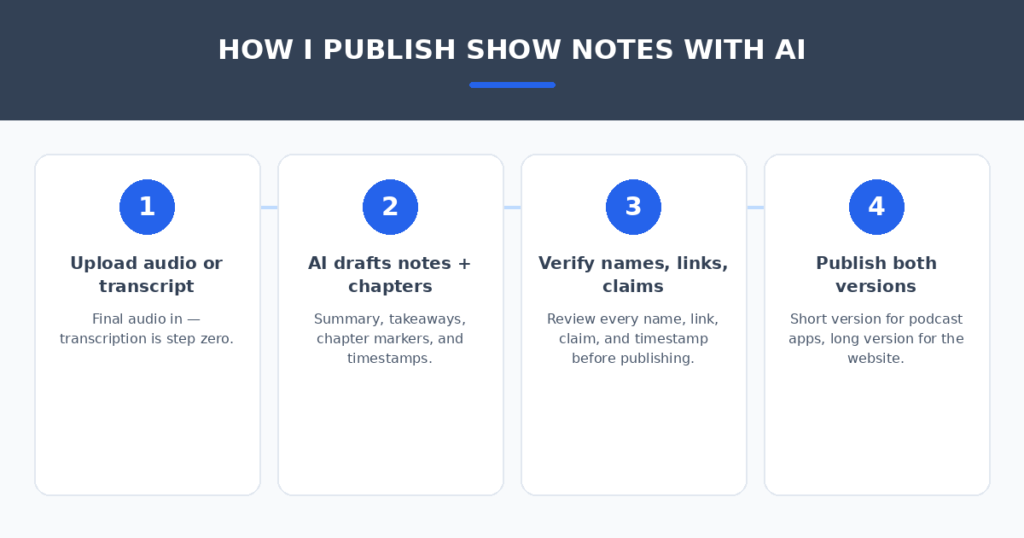
How I publish show notes with AI
The tool matters less than the review. Four habits separated notes I’d publish from notes I’d delete:
- Start from the final audio. Notes generated from a rough cut will reference segments you deleted. Final audio in, always — transcription is step zero.
- Verify every name, link, and claim. AI invents plausible-looking URLs and misspells guest names with confidence. This is the one non-negotiable step — a wrong link in show notes lives forever.
- Write two lengths. A short version for podcast apps (150–250 words) and a long version for your website with full chapters and resources. Every tool here can produce both when asked.
- Add your CTA last. The AI won’t know your current offer, live event, or sponsor. Your call to action goes in by hand, every episode, no exceptions.
Notes published is only half the battle — getting listeners to find the episode matters too. If your podcast has its own site, AI chatbots for small business websites can answer listener questions and recommend episodes around the clock.
FAQ
Will AI show notes hurt my podcast SEO?
No — detailed, accurate show notes help discoverability on Apple Podcasts and Spotify, where search is a top discovery channel. What hurts is thin or inaccurate notes. Review the AI’s output and you’re fine.
How accurate are AI-generated chapter markers?
Surprisingly good — in my test, Castmagic’s markers landed within seconds of the actual topic changes. Still, spot-check the first two chapters of each episode; a mislabeled chapter sends listeners to the wrong moment.
Can AI pull the resources mentioned in an episode?
Yes, and this was a genuine time-saver: books, tools, and people mentioned got extracted reliably, especially from a corrected transcript (Descript’s approach). But every link needs verification — AI invents plausible URLs.
How much should I pay for a show notes tool?
A weekly podcaster fits comfortably in the $18–39/month range (Podsqueeze Starter/Pro, Swell Studio). Heavy publishers who repurpose everything get value from Castmagic’s higher tiers. Monthly shows can often live on free tiers entirely.
Is the free DIY route actually good enough?
For notes alone, yes — a structured prompt on your transcript produced notes that matched the paid tools in my test. Paid tools earn their fee on chapters, clips, repurposing, and not having to copy-paste.
My verdict
For most podcasters, Podsqueeze is the pick — the fastest notes, genuinely publishable output, and $18/month fits a weekly show’s budget. If every episode becomes a content campaign, Castmagic is worth the step up. If you edit in Descript already, its show notes are free with your workflow. And if the budget is zero, ChatGPT or Claude on your transcript is genuinely competitive for notes alone.
The blank description field is a solved problem. Pick the tool that matches your publishing cadence, verify every name and link like the professional you are — and spend the hours you save recording the next episode.
Related reading
Sources: Otter.ai