

Your episode already contains the growth. Somewhere in that 45-minute conversation are eight to twelve moments people would actually watch as a Short — the hot take, the laugh, the quotable answer. The problem was never the content. It was the three hours of scrubbing, cutting, reframing, and captioning required to extract it — the exact grind AI podcast clip makers eliminate.
AI clip makers promise to compress that work into minutes: upload the episode, let the AI find the moments, get captioned vertical clips ready to post. I spent three weeks testing that promise. I ran the same 45-minute interview episode through seven tools — then judged the output on whether a clip was genuinely postable, not just technically a clip.
Here’s the honest version: the AI is a tireless assistant, not a social editor. The best tools hand you the moments a human would pick; the weakest hand you random sentence fragments in vertical. What separates them is the quality of the moment-finding, and that’s exactly what I measured.
How I tested these tools
To keep it fair, every tool got the identical input: a 45-minute interview-style podcast episode with two speakers. I scored each on five things:
- Moment quality: Do the clips it picks match what a human editor would choose?
- Caption quality: Are captions accurate, readable, and styled like real Shorts?
- Reframing: Does vertical conversion keep speakers framed, or crop heads?
- Credit math: What does one episode actually cost in credits or minutes?
- Honest pricing: What does a weekly podcaster really pay per month?
The 7 tools I tested
1. OpusClip — the best overall clip maker
OpusClip is the name that dominates this category, and the virality score is why: every clip gets rated 0–99 on its likelihood of performing, scored on hook strength, emotional pull, quotability, and pacing. It’s not picking random moments — it’s predicting scroll-stoppers.
In my test it surfaced 12 clips from the episode, and the top three were the ones I’d have cut myself: the guest’s bold claim about the industry, the host’s follow-up that made them laugh, and the two-sentence answer that summarized the whole episode. Auto-reframing kept both speakers centered in 9:16, and captions came out in 20+ languages with keyword highlights.
Pricing: Free plan with 60 credits/month (1 credit = 1 minute of source, watermarked); Starter $15/month (150 credits, no watermark); Pro $29/month (about $14.50/month billed annually).
| Pros | Cons |
|---|---|
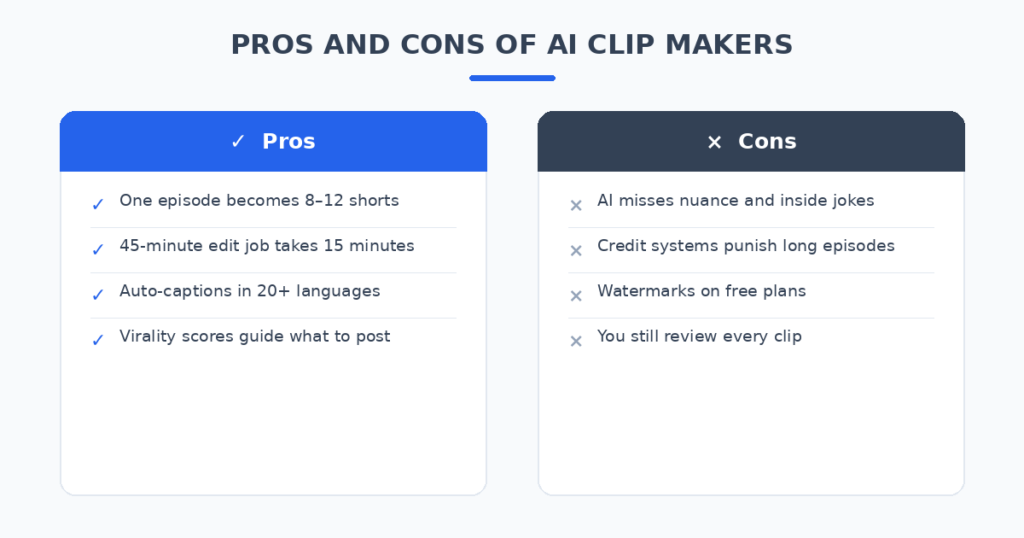
| Virality score picks genuinely strong moments | Credit model punishes long episodes |
| Excellent auto-reframing for two speakers | Free clips expire after 3 days |
| Captions in 20+ languages | AI misses inside jokes and nuance |
Best for: Podcasters who want the AI to decide what’s worth posting.
2. Vizard — the best for teams and approval workflows
Vizard takes a similar AI-clipping approach but wraps it in a proper collaboration workspace: junior editors can draft clips, approvers review them in a shared space, and the social manager publishes — all without traditional editing software. For a podcast network or a business with a content team, that workflow matters more than any single feature.
Clip quality in my test was strong — not quite OpusClip’s moment-picking, but close, with clean captions and a full web editor for fixing anything the AI got wrong. The transcript-based editing (delete a sentence, the footage follows) is easy for non-editors to learn.
Pricing: Free tier with limited processing; paid plans ballpark $15–20/month for around 120 minutes, up to $48/month for heavy volume.
| Pros | Cons |
|---|---|
| Shared workspace with review/approval | Moment-picking slightly behind OpusClip |
| Easy for non-editors to fix mistakes | Higher tiers needed for volume |
| Transcript-based editing | Free tier very limited |
Best for: Podcast teams where someone else reviews before posting.
3. Munch Studio — the best all-in-one social suite
Munch rebranded to Munch Studio in late 2025 and grew from a clipper into a full social media marketing suite. Clipping is now one metered feature inside a platform that also writes posts from your materials, schedules them, and auto-publishes across five platforms with analytics.
The clipping itself is strong and trend-aware, but editing a clip stops at the basics — extend, crop, cut silence. If you only want clips, you’re paying suite prices for suite features. If you want the whole machine (clip, write, schedule, publish, measure), it’s the only tool here that does all of it.
Pricing: From around $48/month; no free plan — trial only.
| Pros | Cons |
|---|---|
| Clip-to-publish in one platform | Overkill (and overpriced) for clipping alone |
| Auto-posting and analytics built in | No free tier to test with |
| Trend-aware scoring | Clip editing stays shallow |
Best for: Businesses that want clips plus scheduling and analytics together.
4. Kapwing — the best full editor with AI clipping
Kapwing isn’t just a clipper — it’s a complete browser-based video editor where AI clipping is one tool among many. That matters when the AI gets something wrong: instead of exporting and finishing in Premiere, you fix it right there in the timeline.
In my test the AI-found moments were good but not elite, while the editing experience was the best of the bunch — real-time collaboration, brand kits, background removal, and 4K exports on paid plans. If your clips need polish beyond what the AI produces, this is where they get finished.
Pricing: Free plan (watermarked, limited); Pro $16/month billed annually ($24 month-to-month); Business $50/month per user.
| Pros | Cons |
|---|---|
| Full editor behind the AI clips | Moment-picking good, not best-in-class |
| 4K exports, brand kits, collaboration | Free exports are watermarked |
| Generous subtitle minutes on Pro | Occasional slow exports reported |
Best for: Creators who always finish their clips with human edits anyway.
5. Ssemble — the best value on credits
Ssemble’s pitch is simple: AI clipping at a fraction of the credit cost. Where competitors charge per source minute, Ssemble charges roughly 1 credit per ~20-minute video — meaning one 45-minute episode costs about 3 credits instead of 45. If you publish weekly, that math adds up fast.
The AI finds solid highlights with plugins for subtitles and hooks, and the editor covers the basics well. It lacks OpusClip’s virality scoring depth, but for budget-conscious podcasters the question isn’t whether it’s the smartest AI — it’s whether it’s smart enough, and at this price, it is.
Pricing: Free tier; paid from around $6–9/month billed annually.
| Pros | Cons |
|---|---|
| Far cheaper per episode than competitors | No virality-score equivalent |
| Solid plugin ecosystem (subtitles, hooks) | Smaller community and fewer reviews |
| Great for high-volume weekly shows | Free tier has tight limits |
Best for: Weekly podcasters who clip everything and watch the credit bill.
6. Riverside — the best if you record here anyway
Riverside’s Magic Clips arrive in a different context: you already recorded the episode there in up to 4K with separate tracks. After recording, the AI generates shareable clips from the same platform — no uploading, no format conversion, no lost quality.
The clips themselves are clean, with stylish animated captions, and you get the full Riverside editing stack (text-based editing, silence removal, AI B-roll) around them. As a pure clipper it’s not beating OpusClip; as a record-to-clip pipeline, nothing here is simpler.
Pricing: Free tier (limited recording); Pro around $24/month billed annually includes Magic Clips.
| Pros | Cons |
|---|---|
| Zero-upload workflow: record, then clip | Overkill if you record elsewhere |
| 4K quality with separate tracks | Clip AI solid but not the smartest |
| Text-based editing built in | Pricing is inconsistent — check current page |
Best for: Podcasters who record in Riverside and want clips for free-ish.
7. Descript — the best transcript-first editing
Descript approaches the problem sideways: it’s a text editor that edits video. Your episode becomes a transcript; you highlight the sentences you want and they become a clip. There’s AI assistance for finding highlights, but the real strength is control — every cut lands exactly on the word.
This is the tool for podcasters who don’t trust any AI to pick their moments. The AI finds candidates, you pick the winners, and the edit is frame-accurate because it’s driven by the actual audio timing. It takes longer than OpusClip’s one-click flow, but nothing gets clipped mid-syllable.
Pricing: Free tier; paid plans ballpark $12–24/month.
| Pros | Cons |
|---|---|
| Word-perfect cuts, no clipped syllables | More manual than true auto-clippers |
| You stay in control of every moment | Learning curve for non-editors |
| Excellent for interview clean-up too | Not a set-and-forget workflow |
Best for: Podcasters who want AI suggestions but make the final call themselves.
AI Podcast Clip Makers: Quick Comparison
(Pricing changes often — treat these as ballparks and check current plans before deciding.)
| Tool | Starting price | Moment-finding AI | Auto-captions | Direct publishing | Best for |
|---|---|---|---|---|---|
| OpusClip | Free / $15/mo | Virality score 0–99 | 20+ languages | Yes (Pro) | Best overall |
| Vizard | Free / ~$20/mo | Strong | Yes | Yes | Team workflows |
| Munch Studio | ~$48/mo | Trend-aware | Yes | Yes, with scheduler | All-in-one suite |
| Kapwing | Free / $16/mo | Good | Yes | Yes | Full editing |
| Ssemble | Free / ~$6/mo | Solid | Yes | Yes | Budget volume |
| Riverside | Free / ~$24/mo | Good | Yes | Yes | Riverside recorders |
| Descript | Free / ~$12/mo | Assisted | Yes | Manual | Transcript control |
How to turn one episode into a week’s worth of shorts
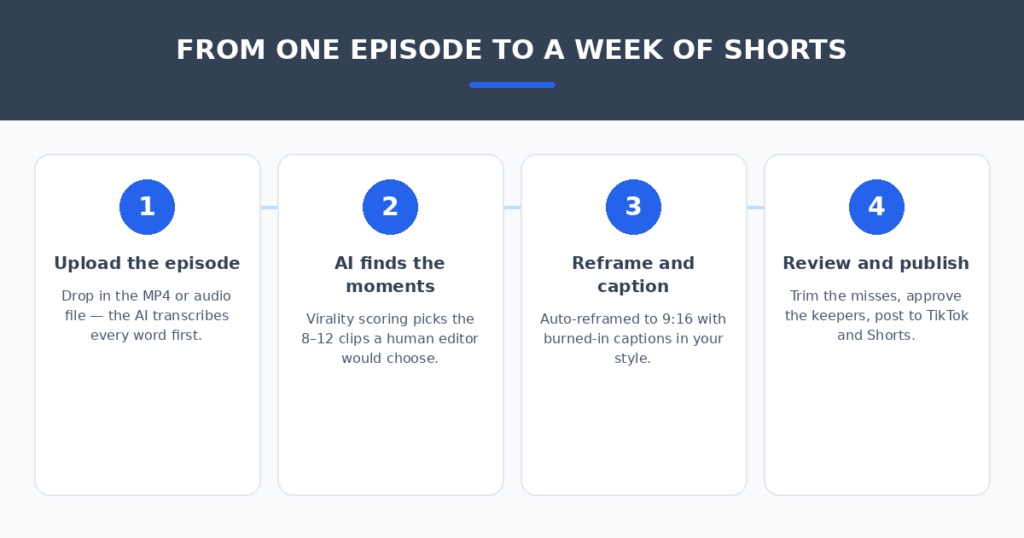
The tool matters less than the workflow around it. Four habits made the biggest difference in my tests:
- Feed it the full episode, uncut. The AI needs context to find moments — pre-trimmed audio starves the scoring. Upload the raw episode and let it see everything.
- Review all clips before posting anything. Even the best AI produced one clip in twelve that misfired — an awkward cut, a claim stripped of context. Fifteen minutes of review protects your reputation.
- Batch one episode at a time. Process the whole episode, schedule all keepers across the week, then move on. Switching tools between episodes breaks your style consistency.
- Write your own captions hooks. The AI’s titles are fine; your show-specific hook is better. Rename the top 3 clips yourself — that one line decides the click.
If you freelance as a podcast editor, the business side matters too — I compared AI proposal generators for freelancers that turn a client brief into a signed quote, and AI invoice generators for freelancers that turn your finished episodes into paid invoices in minutes.
FAQ
Are AI-generated clips actually good enough to post?
The top 3–5 clips from the best tools: yes. The AI nails clear moments — bold claims, funny exchanges, quotable answers. It struggles with subtle humor, context-dependent jokes, and slow-burn insights. That’s why the review step is non-negotiable, not optional.
Do I need a paid plan, or is free enough?
Free tiers are genuine trials, not production plans: watermarks, credit caps, and expiring exports (OpusClip’s free clips expire after 3 days). If you clip one episode a month, free works. Weekly shows need at least a Starter-tier plan — budget $15–25/month.
Which is better for audio-only podcasts: these tools or Descript?
For audio-only shows, you still need visual interest — waveforms, captions, guest photos. Descript gives you the most control over that assembly; OpusClip-style tools automate it. If your podcast has no video, lean toward Descript or Kapwing over pure auto-clippers.
Will posting AI clips hurt my channel with duplicate content?
No — platforms treat your own repurposed content as original when it carries new captions, reframing, and titles. What does hurt is posting twelve near-identical clips: keep the best 5–8 per episode and space them across the week.
Do I still need captions if the platform auto-captions?
Yes. Burned-in captions are a style and retention choice, not just accessibility — viewers watch muted, and styled captions (keyword highlights, emoji pacing) keep them watching. Every tool here burns captions in during export; platform auto-captions are the fallback, not the look.
My verdict
For most podcasters, OpusClip is the pick — the virality score genuinely finds the moments a human editor would choose, and $15/month is cheap for a week of content. If you clip on a tight budget, Ssemble stretches credits furthest. If you record in Riverside, use the Magic Clips you’re already paying for. And if you don’t trust any AI with your moments, Descript gives you word-perfect control.
One episode, one upload, a week of Shorts. Pick the tool that matches your volume and your trust in automation — then spend the hours you save on the next episode, not the editing timeline.
Related reading
- AI show notes generators for podcasters
- AI tools to automate social media scheduling
- free AI writing tools
Sources: Descript