

Posting on social media every day is a second job — and it’s the first thing that collapses when client work piles up. The irony: AI tools that automate social media scheduling have made auto-scheduling the default in every major scheduler, and the old “Tuesday at 10am” charts are obsolete because platforms personalize posting-time recommendations to your audience.
So the real question isn’t whether to automate scheduling. It’s which tool’s AI actually saves you time versus which is just a calendar with a robot logo. I spent three weeks running the same content through six schedulers — Buffer, Later, Hootsuite, Sprout Social, Metricool, and Publer — testing caption quality, AI scheduling smarts, analytics, and what each one really costs at small-business scale.
Here’s the honest version: the AI drafts are genuinely useful, the auto-scheduling works, and the cheapest good option costs less than a takeaway coffee per month. The expensive part is picking the wrong pricing model for how many channels you run.
How I tested these tools
To keep it fair, every tool got the same job: take one blog article, turn it into a week’s worth of platform-native posts, and schedule them at sensible times. I scored each on four things:
- AI caption quality: Does the AI write in a usable brand voice, or generic filler?
- AI scheduling smarts: Does it pick genuinely good times, or just fill slots?
- Honest pricing: What does a small business actually pay — is the free tier usable?
- Analytics depth: Can I see what worked without paying for an add-on?
The 6 tools I tested
1. Buffer — the best value for solo and small teams
Buffer is the easiest way to start AI-assisted scheduling without paying for features you won’t use. The AI assistant handles the part everyone dreads — coming up with something to say. You give it a topic or paste in a blog post, and it drafts caption options and extracts social snippets for repurposing. The content-repurposing alone can save hours a week if you publish a blog.
It also suggests best times to post based on your audience’s activity and recommends hashtags. The whole thing is clean, fast, and free to start — which is why it’s my default recommendation.
Pricing: Free (3 channels, 10 scheduled posts per channel, basic AI drafts); Essentials from around $6/channel/month; Team from around $12/channel/month with unlimited seats.
| Pros | Cons |
|---|---|
| Cheapest AI-assisted scheduling | Per-channel pricing scales badly past 5 accounts |
| Excellent content repurposing | No social listening features |
| Unlimited seats on Team plan | Analytics are basic vs Sprout/Metricool |
Best for: Solo founders and small teams managing a few channels who want AI help without an agency budget.
2. Later — the best for visual-first brands
Later is built for brands that live on Instagram, TikTok, and Pinterest: the visual content calendar is the best in the category — you see your grid before you post. Its AI caption writer produces solid Instagram-style captions and suggests hashtags, and smart scheduling picks posting times from your audience data.
Where it loses points: it’s weaker on text-first platforms like X and LinkedIn, and its Starter pricing has moved around in 2026, so check the live toggle. But for a visual brand, nothing beats planning a month of content by dragging thumbnails around a calendar.
Pricing: Free tier (1 profile per platform); Starter from around $18.75/month billed annually.
| Pros | Cons |
|---|---|
| Best visual calendar for Instagram brands | Pricing has shifted — verify live plans |
| Solid AI caption writer | Weaker on X and LinkedIn |
| Usable free tier | Free tier is limited for heavy posters |
Best for: Retail, hospitality, and creative businesses that post primarily to visual platforms.
3. Hootsuite — the all-in-one for growing teams
Hootsuite takes the everything-under-one-roof approach: scheduling, AI writing, social listening, analytics, and ad management. Its AI layer, OwlyWriter, goes beyond captions — it can write entire posts from a URL or keyword, repurpose your top-performing past content automatically, and suggest captions based on trending topics.
The decision to buy Hootsuite has to be won on listening and team workflows, not scheduling — every tool on this page schedules. The catch is the pricing model: per-user pricing (~$99/user/month annually) means adding teammates multiplies the bill, where Buffer’s Team plan doesn’t.
Pricing: Standard from around $99/user/month billed annually (~$149 month-to-month); 30-day trial, no lasting free plan.
| Pros | Cons |
|---|---|
| OwlyWriter AI writes from URLs and keywords | Per-user pricing punishes team growth |
| Social listening and sentiment built in | Overkill (and overpriced) for solo users |
| Ads and analytics under one roof | No free tier — trial only |
Best for: Marketing teams managing 5+ accounts that need listening, approvals, and reporting together.
4. Sprout Social — the best analytics and social customer care
Sprout Social is the tool for businesses that use social media for customer service, not just marketing. Its smart inbox routes messages by priority, sentiment analysis flags unhappy customers, and the AI suggests responses. The analytics are the deepest in this group — the kind of reporting that justifies a social budget to a skeptical owner.
The tradeoff is obvious: it’s the most expensive tool here, with no free tier and per-seat pricing. For pure scheduling, it’s overkill. But if social is a customer-service channel for you, the inbox alone earns the price.
Pricing: From around $249/month (roughly $199/seat in some reads); 30-day trial, no free plan.
| Pros | Cons |
|---|---|
| Best-in-class analytics and reporting | Most expensive tool in this roundup |
| Smart inbox for customer care | No free tier |
| Sentiment analysis that actually works | Overkill for simple scheduling needs |
Best for: Mid-market businesses using social for customer service plus marketing.
5. Metricool — the best budget analytics combo
Metricool’s pitch is simple: scheduling plus real analytics in one login, at a fraction of Sprout’s price. The free tier is genuinely usable, paid plans start around $20/month, and the AI auto-scheduling handles the timing question. You also get ad tracking and competitor analysis that tools twice the price gate behind add-ons.
The AI writing is thinner than Buffer’s or Later’s — you’ll do more caption drafting yourself — and the interface is less polished. But if your priority is knowing what worked rather than generating what to say, Metricool is the value pick.
Pricing: Free tier; paid from around $20–$22/month.
| Pros | Cons |
|---|---|
| Analytics included at budget prices | AI caption writing is weaker |
| Usable free tier | Less polished interface |
| Ads and competitor tracking included | Smaller support footprint |
Best for: Data-minded small businesses that want scheduling and analytics without the enterprise bill.
6. Publer — the best for multi-platform managers
Publer is the quiet workhorse: cheap, handles many platforms, and excels at bulk scheduling and evergreen content recycling. Set up content categories, and Publer rotates your evergreen posts through the calendar automatically — the closest thing to a “set and forget” social presence in this group.
Its AI features are thinner than the category leaders, and it’s less known, which means a smaller community and template library. But at roughly $12/month for the Pro plan with a free tier to start, it’s hard to argue with the value.
Pricing: Free tier; Pro from around $12/month.
| Pros | Cons |
|---|---|
| Evergreen recycling runs itself | AI features thinner than leaders |
| Bulk scheduling across many platforms | Smaller community and templates |
| Excellent price for what you get | Less polished than Buffer/Later |
Best for: Managers juggling many platforms who want bulk scheduling and automatic recycling.
AI tools that automate social media scheduling: quick comparison
(Pricing changes often — treat these as ballparks and check current plans before deciding.)
| Tool | Starting price | Free tier | AI strength | Best for |
|---|---|---|---|---|
| Buffer | ~$6/channel/mo | Yes (3 channels) | Captions, repurposing, best-time | Solo/small teams |
| Later | ~$18.75/mo | Yes (limited) | Caption writer, hashtags, smart schedule | Visual brands |
| Hootsuite | ~$99/user/mo | No (trial) | OwlyWriter, listening, sentiment | Growing teams |
| Sprout Social | ~$249/mo | No (trial) | Smart inbox, sentiment, analytics | Customer care |
| Metricool | ~$20/mo | Yes | Auto-schedule, analytics | Budget analytics |
| Publer | ~$12/mo | Yes | Auto-schedule, recycling | Multi-platform |
How to schedule a month of social in one afternoon
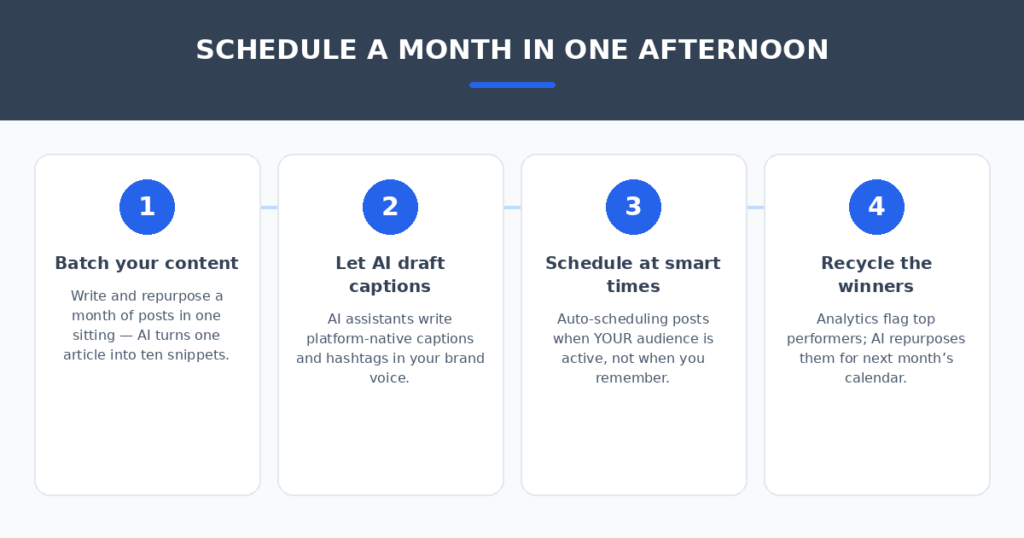
The tool matters less than the routine. Here’s the workflow that produced a full month of posts in a single sitting during my tests:
- Batch your content first. Write and repurpose a month of posts in one session. Paste a blog article into Buffer and it extracts ten social snippets — one piece of long content becomes a week of posts.
- Let AI draft, then edit. AI captions get you 80% there; spend five minutes per post fixing the voice. Never post an AI caption unreviewed — your audience can tell.
- Schedule at AI-picked times. Turn on auto-scheduling and let the tool post when your audience is actually active. The personalized recommendations beat any generic best-time chart.
- Recycle the winners. Check analytics monthly, and let tools like Publer rotate your top performers back into the calendar. Good content deserves a second audience.
FAQ
Is there a free AI social media scheduler that’s actually usable?
Yes — Buffer’s free tier (3 channels, 10 posts per channel) and Metricool’s free tier both cover a small business’s basic scheduling with some AI help. You’ll hit limits if you post daily across many channels, which is when the $6–20/month paid tiers make sense.
Which tool has the best AI caption writer?
Buffer and Later lead for pure caption quality at small-business prices. Hootsuite’s OwlyWriter is more powerful — writing from URLs and trending topics — but you pay ~$99/user/month for it. For most, Buffer’s AI plus five minutes of editing is the sweet spot.
Do I still need to engage manually if I automate scheduling?
Absolutely. Scheduling is not engagement. Automation handles the posting; you still reply to comments and DMs — that’s where customers are won. Think of it as: the robot publishes, the human converses.
How many accounts can I manage on the cheapest plans?
Watch the pricing model, not just the headline price. Buffer charges per channel (~$6/channel/month), so 6 channels costs ~$36/month. Hootsuite charges per user (~$99/user/month), so adding teammates multiplies the bill. Do the channel-and-seat math for your actual setup before choosing.
My verdict
For most small businesses, Buffer is the pick — the free tier is real, the AI repurposing saves genuine hours, and $6/channel/month is honest money. If your brand is visual-first, Later’s calendar is worth the switch. Need listening and team workflows? Hootsuite. Want analytics on a budget? Metricool. Juggling many platforms cheaply? Publer.
One pricing warning before you commit: per-channel and per-user pricing punish different kinds of growth. Count your channels and your seats, run both models, then pick. And if you manage social for clients as a freelancer, pair this with clean billing — I compared AI invoice generators for freelancers that turn a sentence into a send-ready invoice.
The afternoon-batch routine beats the daily-posting grind every time. Pick the tool that matches your channels, let the AI draft, review like a human — and spend the hours you save actually talking to your audience.
Related reading
Sources: Buffer