

A single missed call costs the average business $12.15, and small businesses lose more than $26,000 a year to calls that go unanswered. A survey of small and mid-sized businesses found 42% lose at least $500 a month to missed calls — which is exactly why AI receptionists for missed calls exist — and 85% of customers never call back.
That’s the math behind the AI receptionist boom: a voice AI that answers every call, takes messages, books appointments, and routes urgent issues — at a fraction of what a human receptionist costs. I spent three weeks testing six AI receptionist services on the scenarios that actually matter to small businesses: after-hours calls, spam-heavy days, and appointment-heavy workflows.
Here’s the honest version: the AI is good enough now that most callers won’t notice, if you buy the right one and set it up properly. This guide shows you what to look for first, then how the six top options compare.
What to look for in an AI receptionist
Every vendor claims “human-like voice AI.” Here’s what actually separates the good services from the ones that will embarrass your business:
- Voice quality and latency: The AI should sound natural and respond without awkward pauses. If the demo call feels robotic, your callers will hang up.
- 24/7 coverage with after-hours modes: Missed calls happen nights and weekends — the whole point is coverage when nobody’s at the desk. Check whether after-hours answers are included or an upsell.
- Calendar and CRM integration: The best services book appointments directly into Google Calendar or your CRM and log the call. The worst take a message and email you a transcript you have to act on.
- How you’re billed: Plans charge per minute, per call, per unique caller, or flat-rate. A per-minute plan is cheap for short calls but punishes long ones; per-caller pricing is predictable. Model your real call volume against the plan, not the headline price.
- Human handoff: Good services transfer tricky or emotional callers to you or a live agent. Bad ones force callers through a dead-end menu.
- Call recordings and transcripts: You should be able to read or listen to every call the AI handled. This is how you catch misroutes early.
The 6 AI receptionists I tested
(Pricing changes often — treat these as ballparks and check current plans before deciding.)
1. Goodcall — the best pure AI receptionist for high-volume local businesses
Goodcall is fully automated — no live agents involved — which makes it simple and predictable. Instead of billing by the minute, it charges per unique monthly caller, so a long chatty call costs you the same as a 30-second one. It’s used by 42,000+ businesses and includes a no-code flow builder for custom call logic, FAQ handling, and forms.
For appointment-heavy local businesses — salons, contractors, clinics — that handle lots of routine calls, this is the model that makes sense. The tradeoff is there’s no human backup: if a call gets weird, there’s no agent to jump in.
Pricing: Starter from around $79/month for up to 100 unique callers; Growth around $129/month for 250 callers; $0.50 per caller past the cap.
| Pros | Cons |
|---|---|
| Predictable per-caller pricing, unlimited minutes | No human agents — AI only |
| No-code flow builder for custom call logic | Overkill if you only miss a few calls a day |
| Proven at scale with 42,000+ businesses | Custom flows take setup time to tune |
Best for: Salons, contractors, and clinics with high call volume and routine inquiries.
2. DeskBuddy — the best value for appointment-based service businesses
DeskBuddy targets service businesses that live and die by bookings: stylists, pet services, fitness studios. The headline price is one of the lowest in the market — around $39.90/month for 100 calls — with full calendar integration and trilingual support. A 7-day free trial with 20 calls and no credit card required makes it low-risk to test.
Conversation quality is its selling point: the company reports business owners regularly hear “I thought I’d hired a receptionist” from callers. Complex situations trigger an automatic human handoff so nobody falls through the cracks.
Pricing: From around $39.90/month for 100 calls; 7-day free trial (20 calls), no credit card required.
| Pros | Cons |
|---|---|
| Lowest entry price among tested services | Free trial is short (20 calls) |
| Deep calendar integration for bookings | Trilingual support may be more than you need |
| Automatic human handoff for complex calls | Best suited to appointment businesses |
Best for: Appointment-based service businesses that want the lowest entry price.
3. byVoice — the best all-rounder with CRM depth
byVoice positions itself as the full-stack option: AI call handling plus appointment scheduling, lead qualification, outbound communication, and CRM integrations in one platform, with multilingual support. It’s the pick when your phone is tied to a real sales pipeline rather than just a calendar.
Entry pricing starts low, but costs scale with minutes, call volume, integrations, and setup complexity — so a busy shop can end up paying several hundred a month. Get a quote at your actual call volume before you decide.
Pricing: From around $29/month entry-level AI reception; rises to several hundred per month for advanced setups.
| Pros | Cons |
|---|---|
| CRM and calendar integrations in one platform | Pricing scales with volume — quotes required |
| Lead qualification, not just message-taking | More platform than a simple shop needs |
| Outbound calling included | Setup complexity is higher |
Best for: Businesses that treat inbound calls as sales leads, not just bookings.
4. QuoteIQ — the best deal when you want a CRM bundled in
QuoteIQ takes a different angle: the AI answering service comes inside a full contractor CRM at around $29.99/month. Estimates, scheduling, invoicing, payments, review automation, and the AI call team all live in one product. Standalone AI answering services charge $200–500/month just to answer phones — QuoteIQ’s pitch is that you get the whole front office.
The obvious catch: it’s built for contractors and home-service businesses. If you’re not quoting jobs and scheduling crews, most of the bundle is wasted on you. But for trades businesses missing calls from the truck, it’s the strongest value I found.
Pricing: Around $29.99/month including the CRM suite.
| Pros | Cons |
|---|---|
| AI answering bundled with a full CRM at one low price | Built for contractors — niche fit |
| Inbound and outbound calling | Less useful outside home services |
| Cheapest path to AI + CRM together | YouTube-first brand; less third-party review coverage |
Best for: Contractors and trades businesses that also need quoting and scheduling.
5. Voiply AI Receptionist — the add-on if you’re already on Voiply’s phone system
Voiply, a national VoIP provider for small businesses, launched its AI Receptionist as a premium add-on to its Hosted PBX Premier Plan. If you’re already running your phones on Voiply, this is the path of least resistance: the AI answers when your team can’t, handles common inquiries, and directs callers — without porting numbers or learning a new platform.
As an add-on rather than a standalone service, pricing and availability depend on your Voiply plan. It makes little sense to switch phone providers for it, but it’s the easiest yes for existing Voiply customers.
Pricing: Premium add-on to Voiply’s Hosted PBX Premier Plan (confirm with Voiply).
| Pros | Cons |
|---|---|
| Zero friction if you already use Voiply | Only available to Voiply customers |
| Answers in real time when the team is busy | Add-on pricing not published |
| Keeps callers from going to competitors | Narrow fit by design |
Best for: Small businesses already on Voiply’s phone system.
6. NextPhone — the flat-rate pick for professional services
NextPhone charges a $199/month flat rate for AI intake and reception — answering, qualifying, and booking, 24/7. Flat-rate pricing is rare in this market and makes budgeting simple: your storm week or ad campaign spike costs the same as a quiet week.
The positioning leans toward professional services with lead-qualification needs — the published case material centers on intake-style calls where the AI greets, captures contact details, urgency, and reason for the call, then writes a structured record to the CRM. At $199 it’s the priciest entry point here, so it only makes sense when each answered call is worth real money.
Pricing: Around $199/month flat.
| Pros | Cons |
|---|---|
| Flat-rate pricing — no volume surprises | Highest entry price on this list |
| Structured lead qualification and CRM logging | Overkill for simple message-taking |
| 24/7 intake with call transcripts | Less DIY flexibility than flow-builder tools |
Best for: Law firms, agencies, and service businesses where one captured lead pays for the month.
Quick comparison
(Pricing changes often — treat these as ballparks and check current plans before deciding.)
| Service | Starting price | Billing model | Human handoff | Calendar booking | Best for |
|---|---|---|---|---|---|
| Goodcall | ~$79/mo | Per unique caller | No (AI only) | Yes | High-volume local businesses |
| DeskBuddy | ~$39.90/mo | Per call volume | Yes | Yes | Appointment services on a budget |
| byVoice | ~$29/mo | Minutes + features | Hybrid options | Yes | Lead-driven businesses |
| QuoteIQ | ~$29.99/mo | Flat (bundled CRM) | Via platform | Yes | Contractors needing CRM too |
| Voiply AI Receptionist | Add-on (quote) | Add-on to PBX plan | Routes to team | Varies | Existing Voiply users |
| NextPhone | ~$199/mo | Flat rate | Escalation | Yes | High-value professional leads |
How to deploy an AI receptionist without embarrassing your business
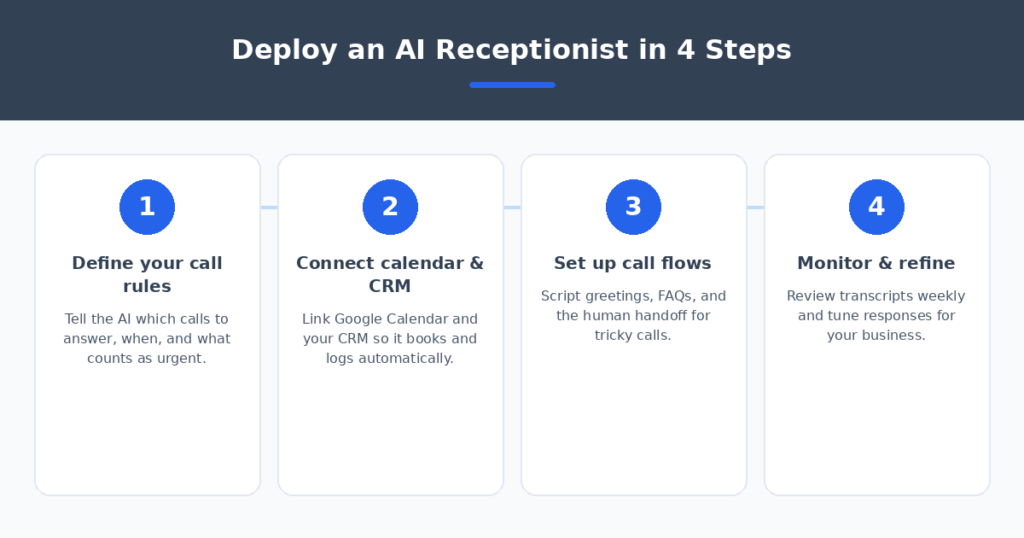
Every missed call is a vote for your competitor — but a badly configured AI is worse than voicemail. Four steps made the difference in my tests:
- Define your call rules first. Which calls does the AI answer (after-hours only? overflow when lines are busy?) and what counts as urgent? Write the rules before you pick the tool.
- Connect your calendar and CRM on day one. An AI that can book into Google Calendar and log callers to your CRM is an employee; one that just emails you transcripts is a fancy voicemail.
- Script the human handoff. Decide exactly when the AI transfers — angry callers, complex requests, high-value leads — and test it with a friend calling in before you go live.
- Review transcripts weekly for the first month. You’ll catch misrouted calls and weird phrasing fast. Most services let you tune responses in minutes.
If your callers mostly need written answers after hours, pair the receptionist with AI chatbots for small business websites so your site answers questions while the AI handles the phone. And restaurants drowning in “are you open” calls should see AI review response generators — missed calls and unanswered reviews are the same lost-revenue problem.
FAQ
Will callers know they’re talking to an AI?
With the better services, usually not. Modern voice AI has natural pacing and handles interruptions well — this isn’t a phone tree or a scripted bot. That said, test it yourself before going live, and listen to real transcripts in the first week.
Is an AI receptionist better than a live answering service?
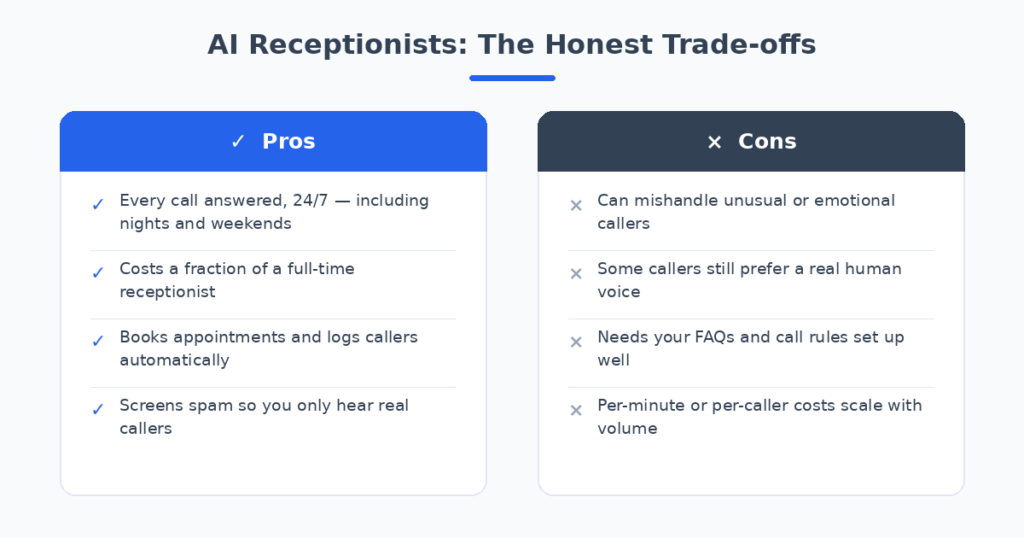
AI wins on cost and 24/7 consistency; live agents win on nuance and emotional situations. The best setup for most small businesses is AI first, human handoff — the AI handles routine calls and passes tricky ones to you or a live service.
How much does an AI receptionist cost for a small business?
Entry pricing runs from around $29–40/month for basic AI answering up to $200+/month for flat-rate or vertical-specific services. Human receptionists cost $35k–50k/year by comparison. Model your real call volume against per-minute or per-caller plans before choosing.
Can an AI receptionist book appointments?
Yes — most services integrate with Google Calendar, Outlook, or booking tools and confirm appointments during the call. This is the feature that pays for the service in appointment-based businesses, so verify the calendar integration works with your setup during the trial.
What happens to spam and robocalls?
AI receptionists filter spam automatically, which is an underrated benefit — you stop getting interrupted by robocalls during work hours. Legitimate callers get through; the rest get handled without your involvement.
My verdict
For most small businesses, DeskBuddy is the pick — the lowest entry price I found, real calendar booking, and a human handoff for calls the AI can’t handle. If you run a high-volume local business where per-caller pricing beats per-minute, Goodcall is the more predictable model. Contractors should look hard at QuoteIQ since the bundled CRM makes the $29.99 price absurd value. And if each answered call is worth real money — law firms, agencies — NextPhone’s $199 flat rate pays for itself with a single captured lead.
Stop losing $12 every time the phone rings unanswered. Pick the service that matches your call volume, connect your calendar on day one, review the transcripts for a month — and never send another caller to a competitor’s voicemail line.
Related reading
Sources: RingCentral