

A customer lands on your website at 11pm with a simple question about pricing — exactly the moment AI chatbots for small business websites are built for. Nobody’s there to answer. By morning, they’ve bought from a competitor who had a chatbot.
This isn’t hypothetical — it’s the most common way small businesses lose sales they never knew about. You can’t staff live chat around the clock, but a decent AI chatbot can answer the repeat questions, capture the lead, and hand off the tricky stuff to you in the morning.
I spent three weeks installing chatbot after chatbot on a test site: the same set of 20 FAQs, the same lead-capture form, the same “talk to a human” fallback. Here’s what actually works under $30 a month — and what’s just a dressed-up contact form.
What a small business actually needs from a chatbot
Forget the enterprise feature lists. For a small business website, a chatbot needs to do four things well:
- Answer FAQs 24/7 from your real content — hours, pricing, shipping, booking.
- Capture leads when it can’t answer — name, email, and the question, straight to your inbox.
- Hand off to a human gracefully instead of looping “I don’t understand.”
- Set up in an afternoon without a developer.
Everything else is nice to have. Price matters too: there’s no reason a 5-person business should pay enterprise rates. Every tool below is free or under $30/month.
The 8 tools I tested
1. Tidio — the best all-rounder for small stores
Tidio is the most popular small-business chatbot for a reason. Its Lyro AI agent answers FAQs, tracks orders for ecommerce stores, and captures leads. Setup took me about 40 minutes: install the WordPress plugin, paste in your FAQs or let it crawl your site, done.
In my test, Lyro handled 16 of my 20 FAQs correctly on the first try — the best score of any tool here. The misses were pricing questions with too many variables, which it correctly escalated to email capture instead of guessing.
Pricing: Free tier available; AI plans from around $29/month.
| Pros | Cons |
|---|---|
| Best FAQ accuracy in my test | AI plan sits near the top of this budget |
| Great WordPress + Shopify plugins | Conversation limits on cheaper tiers |
| Order tracking for ecommerce | Analytics are basic |
Best for: Online stores and support-heavy small businesses.
2. Crisp — the best free starting point
Crisp pairs live chat with automation, and its free tier is genuinely usable: shared inbox for two people, mobile apps, and a contact form for after-hours. The catch is that the free bot is rule-based, not conversational AI — you write the questions and answers yourself.
I recommend Crisp to businesses that mostly need live chat during the day and a lead form at night. If you want real AI answers, the Pro plan at $25/month unlocks the full chatbot builder.
Pricing: Free; Pro from $25/month.
| Pros | Cons |
|---|---|
| Excellent free live-chat tier | Free bot is rule-based, not AI |
| Clean, modern widget | “Powered by Crisp” branding on free |
| Good mobile apps | Social channels need the paid plan |
Best for: Businesses starting from zero that want live chat first.
3. Tawk.to — the free option with no catch (mostly)
Tawk.to’s core live chat is completely free — no conversation limits, no trial period. AI answers are available as add-ons. It’s less polished than Tidio or Crisp, but for a business that just needs a chat widget that works, it’s hard to argue with free.
In my test, the widget installed in minutes and the mobile app worked well. The interface feels dated, and training the AI takes more manual effort than the paid tools.
Pricing: Free core; AI add-ons extra.
| Pros | Cons |
|---|---|
| Free with no real limits | Dated interface |
| Unlimited agents on the free plan | AI setup is more manual |
| Solid mobile apps | Widget design less modern |
Best for: The tightest budgets — free forever.
4. Chatbase — train a bot on your website in minutes
Chatbase takes a different approach: give it your website URL and it trains a GPT-powered bot on your content automatically. No flow builder, no scripting. Of all the tools here, it had the fastest path from signup to working bot — under 15 minutes in my test.
Accuracy was good on content that exists on the site, weaker on anything it had to infer. The lesson: Chatbase is only as good as your website content. If your FAQ page is thin, the bot will be too.
Pricing: Plans from around $25/month.
| Pros | Cons |
|---|---|
| Fastest setup — minutes, not hours | Limited live-chat features |
| Good answers from site content | No built-in human handoff inbox |
| Simple, transparent pricing | Accuracy depends on your content |
Best for: Content-rich sites that need answers, not live chat.
5. ManyChat — best if your customers are on social
ManyChat started as a Messenger bot and still shines wherever customers message you: Instagram DMs, WhatsApp, and your website. If your business gets most inquiries through social, ManyChat lets one bot handle all of it.
The website widget is decent but not its strength — this is the pick for social-first businesses. The flow builder is visual and genuinely easy to use.
Pricing: Free tier; Pro from $15/month.
| Pros | Cons |
|---|---|
| Best social channel coverage | Website widget is secondary |
| Visual flow builder | AI features cost extra on some tiers |
| Affordable Pro plan | Learning curve for advanced flows |
Best for: Businesses whose customers message on Instagram or WhatsApp.
6. Zoho SalesIQ — best if you already use Zoho
Zoho’s chatbot (with its Zia AI) integrates deeply with the Zoho ecosystem — CRM, email, helpdesk. If you run your business on Zoho, this is the obvious choice: visitor info flows straight into your CRM with no plugins.
Standalone, it’s a solid mid-pack bot: decent AI answers, good visitor tracking, reasonable pricing. There’s a free tier to start.
Pricing: Free tier; paid plans affordable (well under $30/month for small teams).
| Pros | Cons |
|---|---|
| Deep Zoho CRM integration | Less compelling outside Zoho |
| Good visitor tracking | Smaller template library |
| Affordable | Interface takes some learning |
Best for: Businesses already running on Zoho.
7. HubSpot — the best free CRM-linked chat
HubSpot’s free chatflows won’t win any AI awards, but they’re free, they connect to a genuinely good free CRM, and every conversation becomes a contact record automatically. For a small business setting up its first chatbot, that’s a strong package.
The bot is rule-based on the free tier — you build decision trees. It handles lead qualification (“what service are you interested in?” → route to the right page) better than open-ended questions.
Pricing: Free.
| Pros | Cons |
|---|---|
| Free with a real CRM attached | Rule-based, not conversational AI |
| Every chat becomes a contact | Limited AI on the free tier |
| Good for lead qualification flows | HubSpot branding unless you pay |
Best for: Free lead capture tied to a CRM.
If your chatbot starts booking calls that turn into projects, you’ll need proposals to close them — I tested the tools in AI proposal generators for freelancers.
8. LiveAgent — chatbot plus help desk in one
LiveAgent bundles its AI chatbot with a full help desk: tickets, knowledge base, and live chat in one dashboard. At around $15/agent/month, it’s the cheapest way to get AI answers plus proper ticket management.
In my test, the AI handled routine questions well and escalated cleanly into tickets — no dead ends. It’s more help-desk than pure chatbot, which is exactly right for service businesses.
Pricing: From around $15/agent/month.
| Pros | Cons |
|---|---|
| AI + tickets + knowledge base together | More setup than pure chatbots |
| Clean escalation to human agents | Overkill if you only need a widget |
| Good value per agent | AI is ticket-focused, less sales-y |
Best for: Service businesses that need tickets, not just chat.
Quick comparison
| Tool | Price | AI answers | Live chat | Lead capture | Best for |
|---|---|---|---|---|---|
| Tidio | Free / ~$29/mo | Yes (Lyro) | Yes | Yes | Online stores |
| Crisp | Free / $25/mo | Paid tiers | Yes | Yes | Starting out |
| Tawk.to | Free | Add-on | Yes | Yes | Tight budgets |
| Chatbase | ~$25/mo | Yes | Limited | Yes | Content sites |
| ManyChat | Free / $15/mo | Add-on | Yes | Yes | Social-first |
| Zoho SalesIQ | Free / low $ | Yes (Zia) | Yes | Yes | Zoho users |
| HubSpot | Free | Rule-based | Yes | Yes | Free CRM link |
| LiveAgent | ~$15/agent/mo | Yes | Yes | Yes | Help desk combo |
Setup considerations that matter more than the tool
After installing eight of these, I’m convinced the tool is 30% of the result. The other 70% is setup:
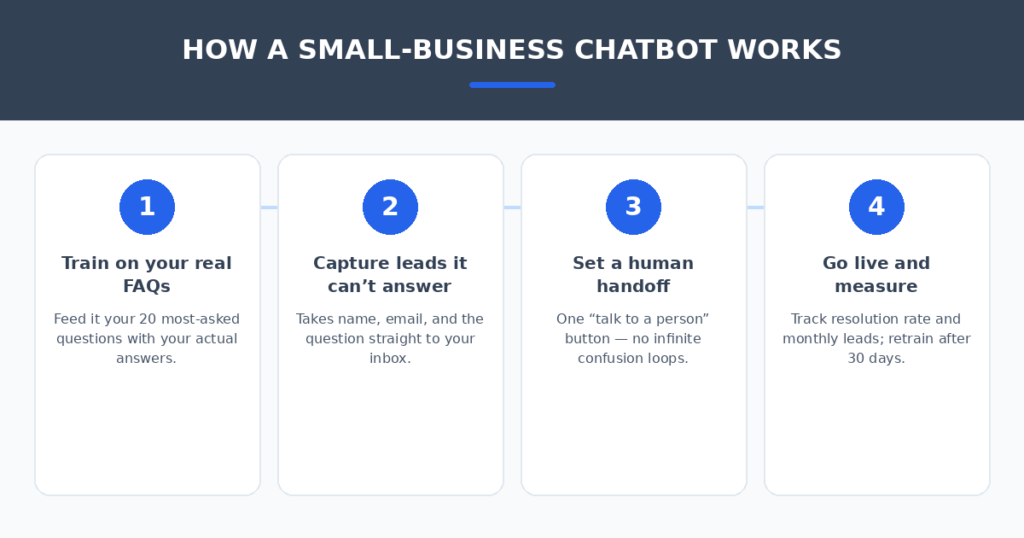
- Train it on your real content. Write (or paste) your 20 most-asked questions with your actual answers. Every bot I tested performed dramatically better with real content versus defaults.
- Always offer a human handoff. The fastest way to lose trust is a bot that loops “I don’t understand.” One button — “Talk to a person” — that emails you the transcript.
- Don’t ambush visitors. Set the widget to appear after 20–30 seconds or on high-intent pages (pricing, contact). A popup in the first three seconds just gets closed.
- Measure two numbers. Resolution rate (answered without human help) and leads captured per month. If both aren’t moving after 30 days, retrain or switch tools.
- Say it’s a bot. A small “AI assistant” label sets expectations and is increasingly expected in some regions. Honesty converts better than pretending anyway.
Restaurants get a lot of “are you open?” messages — pairing a chatbot with automated AI review responses covers both incoming questions and public reputation.
FAQ
Will a chatbot annoy my visitors?
A badly configured one will — popping up instantly, asking irrelevant questions. A well-configured one sits quietly until needed. The annoyance is in the setup, not the technology.
Can a chatbot replace my receptionist or support staff?
No — and it shouldn’t try. Think of it as the night shift: it handles the repeat questions and captures leads, then hands the real conversations to humans. Businesses that frame it this way see the best results.
How long does setup take?
Budget two to four hours for a proper setup: writing your FAQ content, testing conversations, connecting your email or CRM. The “20-minute setup” promise gives you a generic bot that doesn’t sound like your business.
What will it really cost per month?
Most small businesses land between $0 and $29/month. Start free, upgrade when conversation volume justifies it. Watch for per-conversation or per-resolution pricing that can spike — flat-rate plans are easier to budget.
My verdict
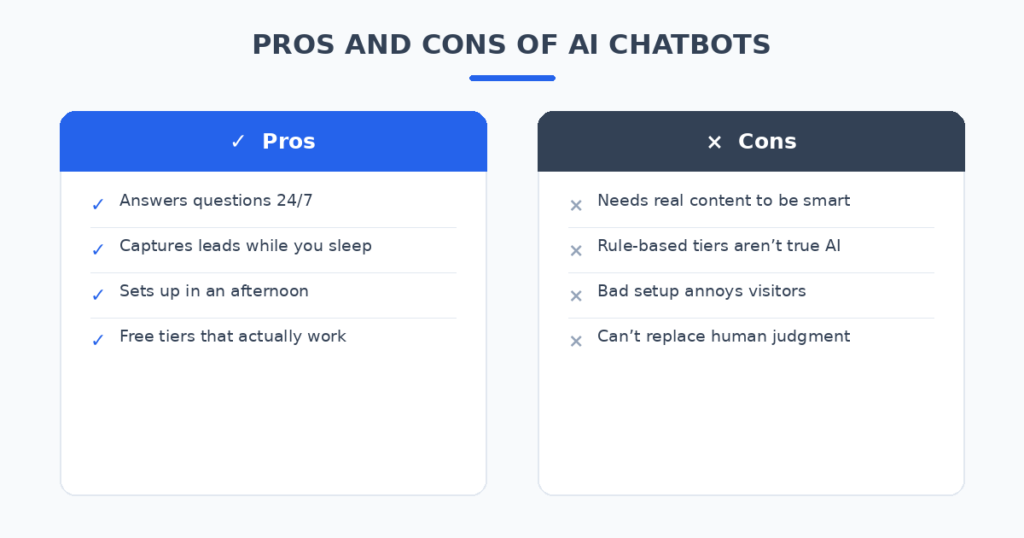
For most small business websites, Tidio is the pick — it had the best answer accuracy in my test and the WordPress setup is painless. If you’re starting from zero and want free, Crisp (for live chat) or HubSpot (for CRM-linked lead capture) cost nothing to try. And if your customers live on Instagram and WhatsApp, skip the website-first tools and go ManyChat.
Install one this week. The customers messaging you at 11pm won’t wait.
Related reading
Sources: Intercom